
SCKit: Attackers Turn MSPs’ ScreenConnect Consoles on Their Customers, Hitting 288 Endpoints in 90 Minutes
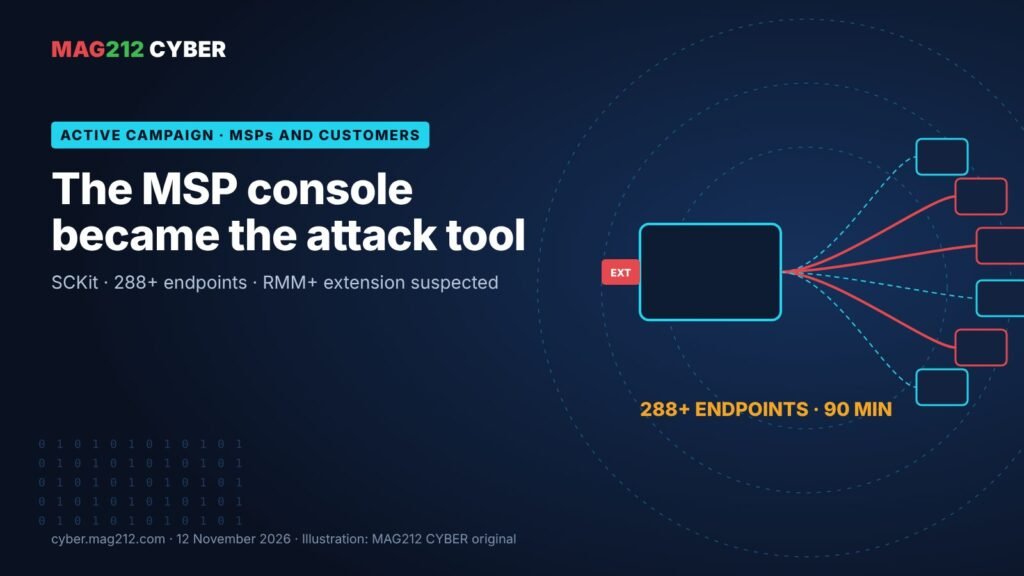
On the afternoon of 11 November, someone used the tools managed service providers rely on to look after their customers as a delivery system against those customers. Through cloud-hosted ConnectWise ScreenConnect panels, the attackers pushed rogue remote-access clients and a 16-file toolkit, SCKit, to at least 288 endpoints in 48 organisations in about 90 minutes. Sophos, Huntress and ConnectWise all confirm the activity. The likeliest way in is not a ScreenConnect bug at all but a third-party extension that, in some setups, accepts a blank key.
| Scale (Huntress) | 288+ endpoints · 48+ organisations · in about 90 minutes |
| Suspected way in | RMM+ extension 1.0.31/1.0.32 accepts a blank key |
| Charge utile | Rogue clients + SCKit (16 files, TrapWatch task) |
| Vendor action | 5 third-party extensions disabled; ~400 environments had one |
Ce qui s'est passé
[Confirmed] Sophos X-Ops is investigating unauthorised ScreenConnect client deployments. It saw three compromised ScreenConnect instances used to run commands and two malicious instances receiving the new clients, and notes that ConnectWise has confirmed the incident and advised disabling the extensions under investigation. (Sophos)
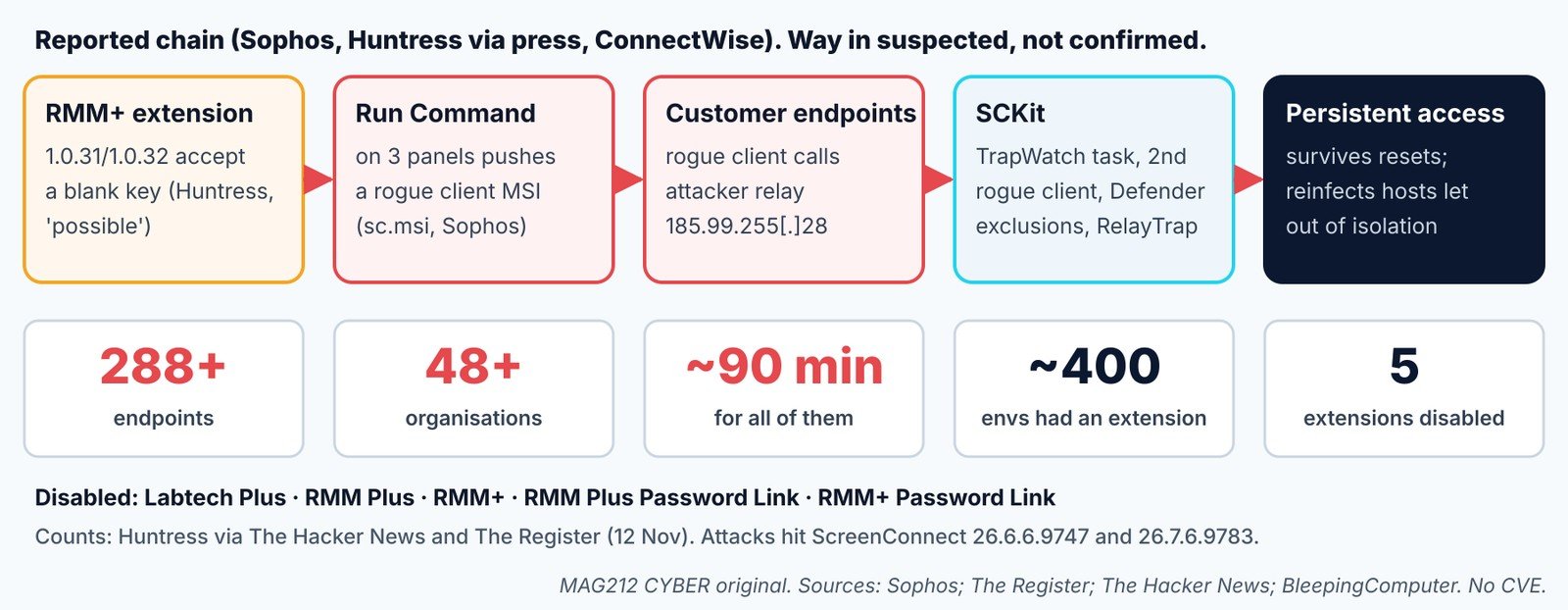
[Reported] Huntress first saw the activity at about 17:47 UTC on 11 November. Attackers used Run Command on cloud-hosted ScreenConnect panels to install rogue clients on at least 288 endpoints in 48 organisations, all within about 90 minutes and roughly a third in the first ten. Huntress’s first count on Reddit was six MSPs. The rogue clients deliver SCKit, a 16-file toolkit. (Les actualités des hackers) (The Register) ConnectWise disabled five extensions (Labtech Plus, RMM Plus, RMM+, RMM Plus Password Link, RMM+ Password Link) where it could, and found about 400 partner environments with at least one installed; that is not a count of victims. (BleepingComputer)
[Reported] Likely way in. Huntress traced the activity to a possible authentication weakness in RMM+, an extension that lets other tools send commands through ScreenConnect without using the console. Versions 1.0.31 and 1.0.32 accept a blank access key when none has been set, and work outside ScreenConnect’s own logins and MFA. Its investigators saw commands arrive with no matching logins. Attacks hit ScreenConnect 26.6.6.9747 and 26.7.6.9783, so being on the latest release didn’t protect anyone. (The Register) ConnectWise says it has found no evidence of a compromise of its own infrastructure or of a ScreenConnect vulnerability, and that initial access is still under investigation. No CVE is assigned. Its November advisory wasn’t on the public advisories index when MAG212 checked. (Les actualités des hackers) (ConnectWise)
Who is affected and how it works
[Reported] MSPs whose ScreenConnect has one of the five extensions, especially RMM+, and every organisation they manage. ConnectWise says having an extension doesn’t mean a partner was compromised, that disabling it doesn’t remove access already gained, and that on-prem owners must disable the extensions themselves. (BleepingComputer) [Confirmed] In one case Sophos saw curl.exe download the client to C:\Windows\TEMP\sc.msi, msiexec.exe install it silently, then PowerShell with an execution-policy bypass fetch a second-stage script. (Sophos) [Reported] SCKit adds Defender exclusions, installs a second attacker-controlled client, creates a scheduled task named TrapWatch and replaces the genuine ScreenConnect install with an attacker copy. A component Huntress calls RelayTrap waits for a technician to connect, to steal session cookies and pivot to other panels; Huntress rebuilt that step from code and hasn’t seen it succeed. Some machines were reinfected within minutes of leaving isolation. (Les actualités des hackers) (The Register)
Que rechercher
| Taper | Indicateur (désactivé) | Note |
|---|---|---|
| Relay IP | 185.99.255[.]28 | Hostname “screen”; serves the MSI |
| C2 | newnewnew.gotdns[.]org · soxnewwork.homedns[.]org | Possible: cdn007-digitaldownloads[.]com |
| Secondary C2 | sc.payproofkit[.]com (155.94.150[.]39) | Hostname WIN-FB5CKHMU4E1 |
| Stager | hxxps://ns.mo7sen[.]dev/EadF.php?p=4 | PowerShell second stage |
| Malicious instance IDs | 2588ef5c15954b10 · ed630cc2c873b091 | Sophos; the second also appears in a July sample |
| Compromised instance IDs | d905b2b1b165d0a9 · 4b8f4089ddaac6a9 · df1f7ef0cfacd0d8 | Sophos: panels used to push the clients |
| SCKit artefacts | sckit-run.bat · sckit-decoder.ps1 · TrapWatch.ps1 · Sqlite3.exe · task TrapWatch · C:\ProgramData\RelayTrap\ · Run key RelayTrapLiteAlert | Huntress via The Hacker News; folder and Run key per IT Security Guru |
| Installer | /Bin/ScreenConnect.ClientSetup.msi?…&c=Exploited<N> · C:\Windows\TEMP\sc.msi | Sequential numbering |
| Account / files | Addmin · Panel-Lateral.ps1 · runnew.cmd · ToolboxRelayUploader.exe · Run-Lateral-Full.bat | Purpose not described |
Sources : Sophos; Huntress via BleepingComputer et Les actualités des hackers; IT Security Guru. Huntress’s own post was not opened by MAG212. [Reported] BleepingComputer also found a July 2026 sample, SSA-2026-STATEMENT-15518787.bat, that references the second client ID; any link to this campaign is unclear.
Endpoint sweep
OS: Windows 10/11, Server 2016+ · Shell: PowerShell 5.1 · Privileges: local administrator · READ-ONLY
# ScreenConnect client services: the ID in brackets is the instance the client reports to
Get-CimInstance Win32_Service | Where-Object { $_.Name -like 'ScreenConnect Client (*' } |
  Select-Object Name, State, PathName
# Live connections to the published relay / secondary C2
Get-NetTCPConnection -RemoteAddress 185.99.255.28,155.94.150.39 -ErrorAction SilentlyContinue
# Recently resolved names that match the published domains
Get-DnsClientCache | Where-Object { $_.Entry -match 'gotdns\.org|homedns\.org|payproofkit|mo7sen|cdn007-digitaldownloads' }
# Published file names, and Defender exclusions added by the operator
Get-ChildItem C:\Users,C:\ProgramData,C:\Windows\Temp -Recurse -File -ErrorAction SilentlyContinue `
  -Include Panel-Lateral.ps1,runnew.cmd,ToolboxRelayUploader.exe,Run-Lateral-Full.bat,sckit-*,TrapWatch.ps1
Get-MpPreference | Select-Object ExclusionPath, ExclusionProcess
# SCKit persistence: TrapWatch task, RelayTrap folder, staged installer, Run key
Get-ScheduledTask -TaskName 'TrapWatch*' -ErrorAction SilentlyContinue
Test-Path 'C:\ProgramData\RelayTrap', 'C:\Windows\Temp\sc.msi'
reg query HKLM\Software\Microsoft\Windows\CurrentVersion\Run /v RelayTrapLiteAlert 2>$null
reg query HKCU\Software\Microsoft\Windows\CurrentVersion\Run /v RelayTrapLiteAlert 2>$null
Expected clean result: only your MSP’s own client ID in the service list, False False from Test-Path, and no output from the other commands. Any service ID you don’t recognise, or either published ID, is a hit: isolate the device using your EDR, not ScreenConnect. Commands not tested by MAG212 CYBER. Indicators from Sophos and Huntress via Les actualités des hackers.
Enquêter, contenir et remédier (dans cet ordre)
- Don’t open interactive ScreenConnect sessions to any device that may be compromised. Investigate with separate security tools. (ConnectWise)
- Keep the five extensions disabled, RMM+ above all; on-prem servers, disable them yourself. Keep their installation records and logs. Don’t re-enable until ConnectWise says so.
- Revoir authentication logs, extension installation records, admin activity, Run Command history and Toolbox records, back to before 11 November.
- Revoke active sessions, reset credentials from a trusted device, verify MFA on every ScreenConnect account. (BleepingComputer)
- Isolate and clean infected hosts completely before reconnecting: rogue clients, the TrapWatch task, the RelayTrap folder, SCKit files and the RelayTrapLiteAlert Run key. Huntress saw reinfection within minutes of isolation ending. (The Register) (IT Security Guru)
- [MAG212 analysis] Check that the genuine ScreenConnect client is still the one running; SCKit replaces it with an attacker copy. Reimage confirmed hits if in doubt, and check technician workstations too.
- [MAG212 analysis] Customers: ask your MSP today whether it uses ScreenConnect, whether any of the five extensions were enabled, and what it has checked on your machines.
Vérifier la récupération : every endpoint shows only approved ScreenConnect client IDs; no traffic to the indicators for 72 hours; Run Command history reviewed and signed off; all operator sessions re-established after the credential reset. Prevention [MAG212 analysis]: treat RMM extensions like code you deploy to every customer. An extension with its own API key can sidestep your MFA: keep an approved list, set strong keys on every integration API, restrict operator logins by IP, and alert on Run Command used outside change windows.
Pourquoi c'est important
An MSP’s remote-management console is a master key to every client it serves, which makes it one of the most valuable targets in small-business and school IT. This campaign shows that an add-on with its own API can sidestep the console’s logins and multi-factor authentication entirely, and that once rogue clients are in place, resetting passwords or disabling the extension does not remove them. The speed, a third of victims in ten minutes, leaves no time for manual response.
The bottom line
MSPs should keep the five extensions disabled, review Run Command history now and investigate suspect machines only with separate tools. Every MSP customer should run the endpoint sweep, look for a TrapWatch task or unfamiliar ScreenConnect client IDs, and keep any infected machine isolated until it is fully cleaned.
How we label evidence: [Confirmed] comes from a primary source such as a vendor or CISA; [Reported] from a secondary outlet; [Claimed] from an attacker or an unverified party; [MAG212 analysis] is our judgement; [Unknown] means not established at press time. Commands and indicators are copied from the cited sources and were not tested by MAG212 CYBER.
This story is part of MAG212 CYBER Daily, 12 November 2026, with the day’s other verified stories, the Defender’s Action Desk and a full source register. Get the daily briefing free: subscribe to MAG212 CYBER. Par El Mostafa Ouchen.