
CVE-2026-119977 : La vulnérabilité de mise à jour du noyau WordPress dans CISA KEV, expliquée, avec les versions corrigées pour chaque branche
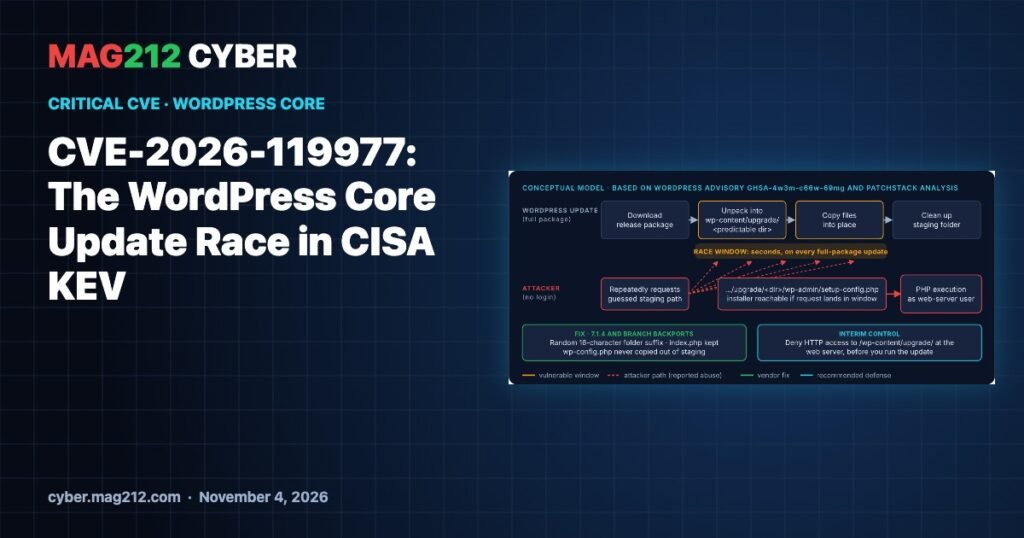
CVE-2026-119977 is a race condition in the way WordPress core installs its own updates. For the few seconds a full-package core update runs, a copy of the WordPress installer sits in a predictable, web-reachable folder. An unauthenticated attacker who requests it at the right moment can reach remote code execution. WordPress fixed it in 7.1.4 on October 28, 2026, with backports for every branch back to 4.7. On November 3, CISA added it to its Known Exploited Vulnerabilities (KEV) catalog, citing evidence of active exploitation.
This guide explains how the race works, which version fixes your branch, the one web-server rule to add before you update, and how to check whether a site was hit.
Faits clés
| Article | Détail |
|---|---|
| CVE | CVE-2026-119977 (CWE-367, time-of-check to time-of-use race) |
| Affected | WordPress core 4.7.0 through 7.1.3, every branch |
| Fixed | 7.1.4, plus a backport for every branch back to 4.7 (table below) |
| Gravité | WordPress rates it Low; Wordfence, the CVE Numbering Authority, scores it CVSS 3.1 8.1 (High, high attack complexity) |
| Exploitation | Listed in CISA KEV on November 3, 2026, with forensic triage flagged |
| Federal deadline | November 6, 2026 (BOD 26-04) |
| Login needed? | Non |
Qu'est-ce qui s'est mal passé ?
A full-package core update downloads the new release, unpacks it into a folder under wp-content/upgrade/, copies the files into place, then cleans up. According to the WordPress advisory, that folder had a predictable name and sat inside the web-served upgrade directory. Patchstack’s analysis adds two details: the folder name came from the package itself, and the cleanup routine deleted the index.php that normally stops directory listing.
So for a few seconds a complete WordPress copy, including wp-admin/setup-config.php, was browsable at a guessable path. An attacker who keeps polling that path can hit the installer mid-update and run it against a database the attacker controls, which leads to PHP running as the web-server user.
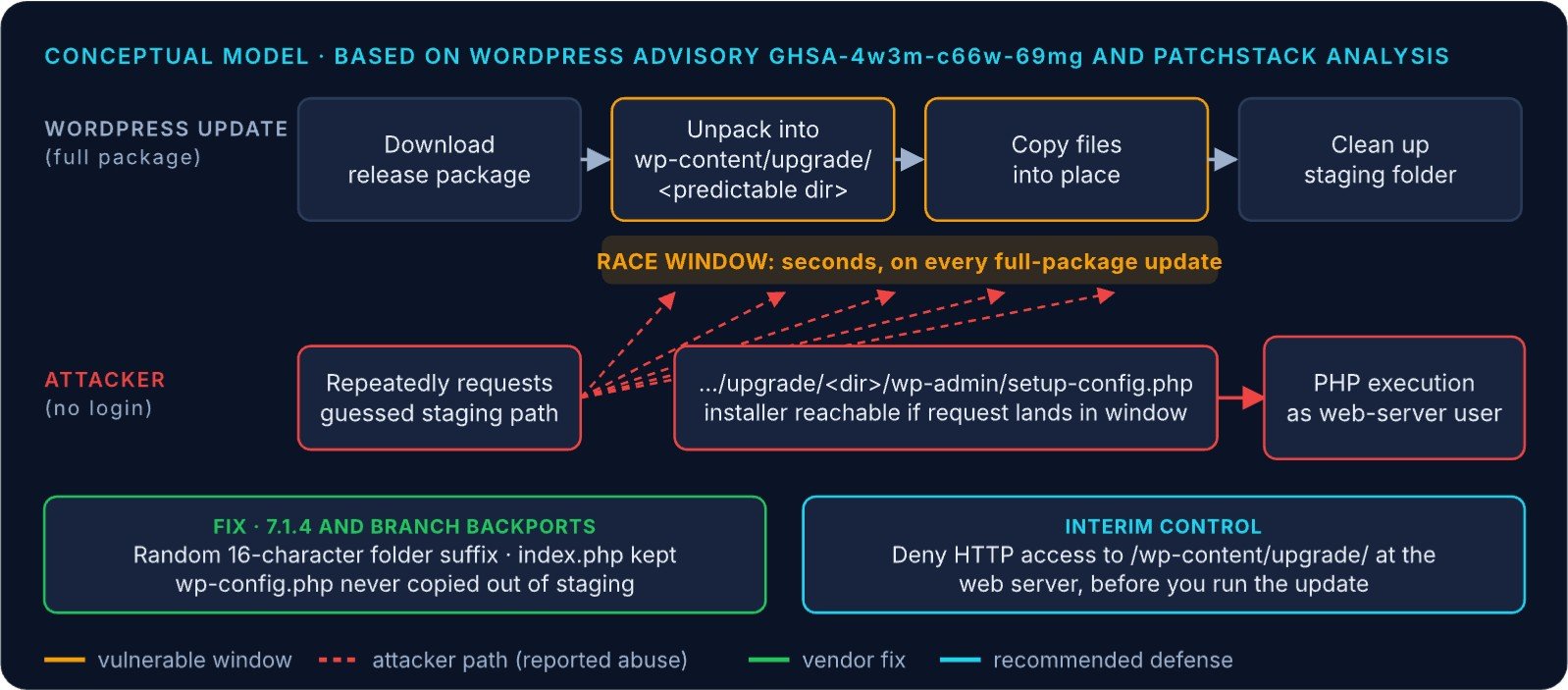
Version 7.1.4 closes the gap three ways: it appends 16 random characters to the staging folder name, keeps index.php in place, and never copies wp-config.php out of the working directory.
How serious is it in practice?
The attack needs three things at once: a full-package core update must be running, the staging folder must be reachable over HTTP, and the attacker’s request must land inside a window measured in seconds. That is why the vendor rates it Low and the CNA marks attack complexity as High. But the window reopens on every such update, including unattended background updates. Wordfence reported automated polling for the staging path within hours of the release, and CISA now lists it as exploited. Treat it as urgent.
One subtlety matters: the update that installs the fix runs under the old, vulnerable code. That is why researchers advise blocking the staging directory before you update.
Fixed version for every branch
| Branch | Affected | Fixé dans |
|---|---|---|
| 7.1 | 7.1.0 – 7.1.3 | 7.1.4 |
| 7.0 | 7.0.0 – 7.0.7 | 7.0.8 |
| 6.9 | 6.9.0 – 6.9.10 | 6.9.11 |
| 6.8 | 6.8.0 – 6.8.11 | 6.8.12 |
| 6.7 | 6.7.0 – 6.7.10 | 6.7.11 |
| 6.6 | 6.6.0 – 6.6.10 | 6.6.11 |
| 6.5 | 6.5.0 – 6.5.13 | 6.5.14 |
| 6.4 | 6.4.0 – 6.4.13 | 6.4.14 |
| 6.3 | 6.3.0 – 6.3.13 | 6.3.14 |
| 6.2 | 6.2.0 – 6.2.14 | 6.2.15 |
| 6.1 | 6.1.0 – 6.1.15 | 6.1.16 |
| 6.0 | 6.0.0 – 6.0.17 | 6.0.18 |
| 5.0 – 5.9 | see advisory | 5.9.20, 5.8.19, 5.7.21, 5.6.23, 5.5.24, 5.4.25, 5.3.27, 5.2.30, 5.1.28, 5.0.31 |
| 4.7 – 4.9 | see advisory | 4.9.35, 4.8.34, 4.7.39 |
| 4.6 and older | — | No fix: migrate |
Step 1: block the staging folder before you update
Deny HTTP access to /wp-content/upgrade/ at the web server or CDN. WordPress writes to this folder through the filesystem, not over HTTP, so updates keep working. A security plugin running inside PHP will not stop this attack: Patchstack notes the staged copy loads its own files, so the site’s PHP firewall never runs for that request.
# NGINX: inside the site's server { } block
location ^~ /wp-content/upgrade/ {
    deny all;
}
sudo nginx -t && sudo systemctl reload nginx

# Apache 2.4: in the VirtualHost (not a file inside upgrade/)
<Directory "SITE_DOCROOT/wp-content/upgrade">
    Require all denied
</Directory>
sudo apachectl configtest && sudo systemctl reload apache2
Put the Apache rule in the virtual host, not in an .htaccess inside the upgrade folder: before 7.1.4, cleanup deleted files there. Replace SITE_DOCROOT with your document root, and adjust the path if WordPress lives in a subdirectory. On managed hosting, ask your host to confirm the block at its web or CDN layer.
Step 2: update and verify
Install 7.1.4 or your branch’s fixed release, then confirm with WP-CLI (run as the site’s system user from the WordPress root):
wp core version                       # expect the fixed release for your branch
wp core verify-checksums              # compares core files with WordPress.org
wp user list --role=administrator --fields=ID,user_login,user_registered
find wp-content/upgrade -mindepth 1 -maxdepth 3 -ls   # normally only index.php
curl -sI https://SITE/wp-content/upgrade/              # expect 403
How to tell whether a site was hit
- Web logs since October 28: requests for PHP files under
/wp-content/upgrade/, especiallysetup-config.php, and bursts of repeated polling from one source. A 200 response to one of these is a red flag. A 404 outside an update window is normal and proves nothing. - Site state: administrator accounts, plugins or PHP files nobody on your team created.
- Timing: line up suspicious requests with your core update times. Hits outside an update window are probably scanning, not a successful race.
sudo zgrep -E '/wp-content/upgrade/[^" ]*\.php' /var/log/nginx/access.log*If you find signs of compromise, preserve logs, a file listing with timestamps and a database export before cleaning. Then remove unknown administrators and files, rebuild from known-good core and plugins if needed, and rotate database credentials, WordPress salts and hosting or SFTP passwords.
Commands were checked against WP-CLI and web-server documentation but not run against live systems for this article. Use them only on sites you are authorized to manage.
Foire aux questions
Which WordPress version fixes CVE-2026-119977?
7.1.4 on the 7.1 branch. Older branches have their own fixed releases, such as 7.0.8, 6.9.11 and 6.8.12, all the way down to 4.7.39. Sites on 4.6 or older get no fix.
Is CVE-2026-119977 being exploited?
Yes. CISA added it to the KEV catalog on November 3, 2026, based on evidence of active exploitation. Public sources do not say how many sites were compromised.
Does my security plugin protect me?
Not on its own. The staged installer loads its own files, so a PHP-level firewall plugin does not run for that request. Block the folder at the web server or CDN.
Why does the vendor rate it Low if CISA lists it as exploited?
The vendor’s rating reflects how hard the race is to win. CISA’s listing reflects evidence that attackers are trying it in the wild. Prioritize by the exploitation evidence.
Sources
- WordPress security advisory GHSA-4w3m-c66w-69mg (Oct 29, 2026)
- CISA: Adds One Known Exploited Vulnerability to Catalog (Nov 3, 2026)
- CISA Known Exploited Vulnerabilities Catalog
- Patchstack: WordPress 7.1.4 Security Release
- Rescana: WordPress Core 7.1.4 upgrade-window race analysis
Articles connexes sur MAG212 CYBER
- When the Update Becomes the Attack: MAG212 CYBER Daily, 4 November 2026
- cPGuard Update Channel Hijacked
- APT29 Watering Holes Target Outdated Phones
- 3AM Ransomware at a UK School Estate
- Synology C3RB3R Ransomware: Safe DSM Builds
- Drupal Commerce Core CVE-2026-118539 Exploited
- Chaque numéro de la bibliothèque de magazines