
LiteLLM Supply-Chain Attack: How Hackers Turned a Trusted AI Package into a Credential-Stealing Backdoor
CYBER.MAG212 | Global Cybersecurity Intelligence
Published: October 23, 2026
By: El Mostafa Ouchen
Category: AI Security, Supply Chain Attacks, Malware Analysis, Critical Security Alerts
A Trusted AI Tool Became an Attack Delivery System
On October 21, 2026, attackers compromised the software release pipeline of LiteLLM, an open-source Python library widely used to connect applications with artificial intelligence services.
The attackers published a malicious version of the package through legitimate software distribution channels, including the Python Package Index (PyPI) and official Docker container registries.
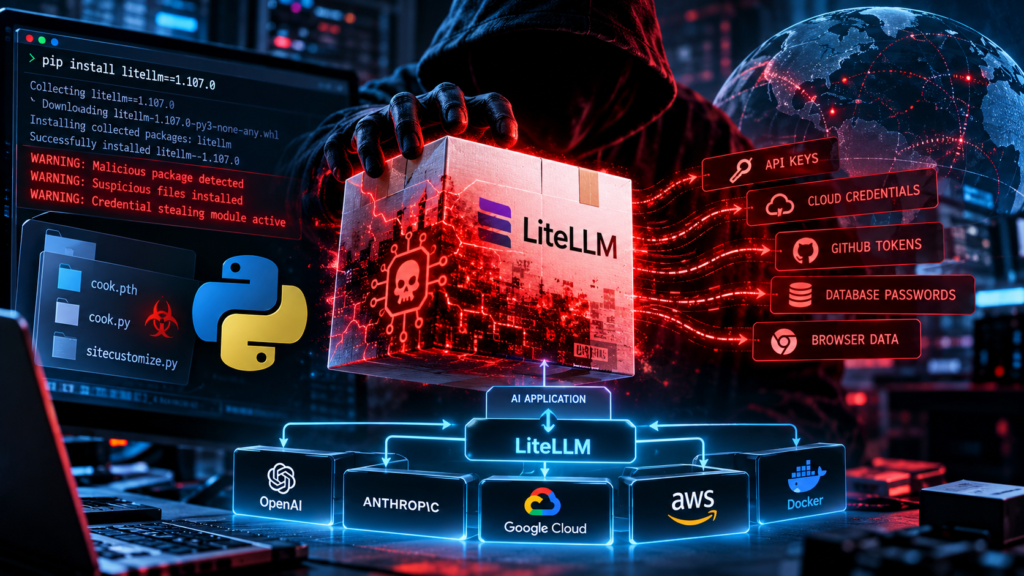
The compromised version, LiteLLM 1.107.0, contained malware designed to steal sensitive credentials and establish infrastructure for remote code execution.
Developers and organizations that installed or executed the affected software could have exposed cloud credentials, AI API keys, database passwords, GitHub authentication tokens, and other secrets.
According to LiteLLM’s official incident report, the attack was contained and the malicious releases were removed. However, environments that executed the compromised software must still be investigated.
The incident demonstrates one of the most dangerous weaknesses in modern software development: a trusted dependency can become a delivery mechanism for malicious code.
What Is LiteLLM, and Why Is It Important?
LiteLLM is a Python-based interface and proxy gateway that allows applications to communicate with multiple AI model providers using a unified integration layer.
Organizations use LiteLLM to centralize AI requests, manage model access, configure API credentials, and monitor usage.
For example, a business application may send its request to LiteLLM, which forwards the request to an AI provider and returns the response to the application.
This architecture is convenient for developers, but it also creates a security-sensitive component.
An AI gateway may have access to authentication tokens, environment variables, databases, and infrastructure configuration.
If attackers compromise the gateway’s software supply chain, the resulting exposure may extend beyond the AI application itself.
How the Attackers Compromised LiteLLM
LiteLLM’s investigation identified activity involving three compromised developer GitHub accounts.
The attacker apparently used stolen GitHub CLI OAuth credentials to manipulate the project’s release workflow.
The investigation described the following sequence:
Step 1 — Compromising developer access
The attacker obtained credentials associated with LiteLLM maintainers.
The exact initial mechanism used to acquire these credentials was not fully established at the time of the incident report.
Step 2 — Changing the release pipeline
A protected release workflow was modified using privileged developer access.
The attack bypassed branch protections and later used another compromised account to approve the release.
Step 3 — Building software from attacker-controlled source
The modified pipeline built release artifacts using an attacker-controlled repository.
Crucially, the legitimate GitHub source tag did not contain the malicious files.
This difference helps explain why reviewing public source code alone may fail to detect certain supply-chain attacks.
Step 4 — Distributing compromised packages
Malicious PyPI packages and Docker images were published through official distribution channels.
Developers retrieving the affected versions could receive the malicious artifacts without recognizing that the release pipeline had been compromised.
Step 5 — Activating the malware
The malicious Python package included startup files capable of activating code when Python initialized.
The malware was designed to collect secrets and provide a mechanism for additional remote execution.
Step 6 — Attempted credential exfiltration
The malicious components searched the local environment for credentials and other sensitive information that could be transmitted outside the compromised system.
The exact information exposed depends on the permissions, files, network access, and secrets available to each affected environment.
Which Versions Were Compromised?
According to the official LiteLLM incident report, the confirmed affected artifacts included:
| Platform | Affected release or tags | Exposure window, October 21 UTC |
|---|---|---|
| PyPI | litellm==1.107.0 | 11:39–13:23 |
| Docker Hub | v1.107.0, latest, main-latest, main-stable | 11:46–14:20 |
| GitHub Container Registry | Corresponding affected container tags | Beginning at 11:46; removed or made unavailable earlier than Docker Hub |
The malicious releases were subsequently withdrawn or replaced with clean artifacts.
LiteLLM stated that its separately distributed private enterprise release was not affected.
Administrators should determine whether any affected version or image digest was actually installed or executed, rather than relying on the currently displayed tag alone.
The Dangerous Python Startup Technique
An especially important element of this attack was the abuse of Python interpreter startup behavior.
Technical analysis identified malicious files including:
cook.pthcook.pysitecustomize.py
Python supports special configuration and customization files used during startup.
The .pth mechanism can execute certain Python statements when the interpreter processes site-package directories.
Likewise, sitecustomize.py may be imported automatically during Python initialization.
Attackers can abuse these legitimate features to trigger malicious execution.
This creates a dangerous condition: the victim may not need to explicitly import LiteLLM for the malware to activate.
Starting another Python-based utility inside an affected environment could potentially execute the malicious startup code again.
That includes Python package-management commands.
For this reason, LiteLLM warned affected users not to begin remediation by running pip install inside a suspected compromised environment.
What Could the Malware Steal?
Security researchers identified credential theft as a central objective of the malware.
Potentially exposed information included:
AI service credentials: API keys used to access external model providers.
Cloud credentials: Tokens and authentication material associated with services such as AWS, Azure, and Google Cloud.
Development credentials: GitHub authentication tokens and SSH private keys.
Database credentials: Passwords and connection strings available to the affected application or host.
Application secrets: Environment variables, LiteLLM master keys, proxy keys, and other configuration secrets.
Browser information: Accessible authentication data and locally stored credentials.
The compromise of an API key may permit unauthorized service usage. Cloud credentials may provide access to infrastructure, while development tokens can potentially enable additional software supply-chain compromises.
The actual impact depends on the privileges associated with each stolen credential.
How IT Administrators Can Investigate
Administrators should perform initial checks using trusted shell utilities, preferably from an isolated investigation environment.
Do not execute Python or pip inside a suspected compromised environment until the startup mechanism has been contained.
Check 1 — Find suspicious Python startup files
On Linux:
sudo find / -type f \
  \( -name 'cook.pth' \
  -o -name 'cook.py' \
  -o -name 'sitecustomize.py' \
  -o -name 'remote_code_loader.lock' \) \
  2>/dev/null
The command searches for files associated with the reported compromise.
The presence of sitecustomize.py alone does not establish malicious activity because legitimate Python environments may use this file.
Investigators must evaluate file paths, contents, timestamps, and package provenance.
Check 2 — Find the affected LiteLLM installation
sudo find / -type d \
  -name 'litellm-1.107.0.dist-info' \
  2>/dev/null
This searches for installed Python package metadata associated with the affected version.
A missing result does not guarantee that an environment was never compromised.
Check 3 — Inspect Docker images
docker image ls --digests
docker ps -a --no-trunc
Review container image history, digest identifiers, and deployment logs.
The compromised Docker Hub image index reported by LiteLLM was:
sha256:1bbcb1443bc962e45f5aad53fe3d2c30600e0379715fb6c664cdd3ac126c339eAn image digest is a stronger historical indicator than a mutable container tag such as latest.
Check 4 — Examine suspicious network activity
Review firewall, DNS, proxy, and EDR records for indicators documented in reputable threat-intelligence reports.
Investigate unusual outbound connections originating from LiteLLM servers, CI/CD runners, developer workstations, and related cloud workloads.
Check 5 — Review authentication activity
Investigate unusual cloud API requests, unfamiliar source addresses, unexpected token usage, unauthorized repository changes, and anomalous database connections.
Use logs from the period surrounding the installation and continue reviewing subsequent credential activity.
What Organizations Should Do If Compromised
Any environment that executed the known malicious release should be treated as potentially compromised.
1. Isolate affected workloads. Restrict network exposure and prevent continued unauthorized communication.
2. Preserve forensic evidence. Collect relevant logs, system metadata, deployment records, and suspected artifacts before rebuilding, where practical.
3. Rebuild from trusted sources. Create clean virtual environments or container images rather than relying solely on deleting suspicious files.
4. Rotate accessible secrets. Replace AI API keys, GitHub tokens, cloud credentials, database passwords, and other secrets available to the affected workload.
5. Audit cloud infrastructure. Review identity activity, role assumptions, API calls, and potential access from unfamiliar systems.
6. Examine software release systems. Review GitHub permissions, workflow modifications, signing procedures, and trusted publishing configuration.
7. Strengthen future deployments. Pin dependency versions and immutable image digests, protect release credentials, scan build artifacts, and limit runtime permissions.
LiteLLM’s October 21 advisory recommended pinning installations to version 1.106.2 or another explicitly identified earlier clean release while remediation continued.
Administrators should consult the project’s latest official security guidance before redeployment.
The Bigger Cybersecurity Lesson
This incident highlights a critical difference between traditional malware attacks and modern supply-chain compromises.
An attacker does not necessarily need to exploit a vulnerability in every individual customer environment.
By compromising software production or distribution, one attacker may reach numerous organizations through otherwise routine installation and deployment processes.
The incident also shows why organizations must secure developer identities, build workflows, cloud credentials, and AI infrastructure as part of one interconnected security architecture.
An organization’s defenses cannot end at its firewall.
Protection must extend to the code it trusts, the packages it installs, the images it deploys, and the credentials its applications can access.
Conclusion: Trust the Process, but Verify the Artifact
The LiteLLM compromise is a warning to organizations rapidly adopting artificial intelligence services.
The same tools that accelerate software development can also expand the consequences of compromised developer credentials or release automation.
The priority for affected organizations is not simply to uninstall a vulnerable package. It is to investigate possible execution, rebuild clean environments, rotate exposed secrets, and verify the integrity of the software delivery process.
A trusted package is only as secure as the systems, identities, and workflows used to build and distribute it.
Sources and Further Reading
- LiteLLM — Official Security Incident Report, October 21, 2026
https://docs.litellm.ai/blog/security-incident-oct-21-2026 - Datadog Security Labs — LiteLLM Supply Chain Compromise: What You Need to Know
https://securitylabs.datadoghq.com/articles/litellm-compromised-pypi-docker/
About CYBER.MAG212
CYBER.MAG212 publishes cybersecurity news, technical analysis, critical vulnerability reports, and practical guidance for IT administrators, security engineers, developers, and technology professionals.
Author: El Mostafa Ouchen
Website: https://cyber.mag212.com
Editorial note: This article reflects verified disclosures available through October 23, 2026. Technical findings may change as the investigation continues.