
SkyW4lker Device-Code Phishing: How It Hijacks Microsoft 365 Accounts and How to Stop It
MAG212 CYBER | Threat Intelligence | October 28, 2026
A Microsoft 365 phishing kit called SkyW4lker never shows its victims a fake login page. It sends them to Microsoft’s genuine sign-in page, lets them complete multi-factor authentication, and walks away with their access and refresh tokens. The trick is the OAuth 2.0 device authorization grant, better known as device-code sign-in, the flow built for TVs and consoles. Below we explain how the attack works, the indicators researchers have published, how to hunt for it in Microsoft Entra logs, and the single control that stops it.
SkyW4lker at a glance
| Key fact | Detail |
|---|---|
| Name | SkyW4lker x365 Sentinel |
| Type | Microsoft 365 OAuth device-code phishing kit |
| First seen | 23 June 2026 (ANY.RUN) |
| Activity | 618 sandbox analyses from June to 21 October 2026; monthly volume rose from about 20 to about 200 |
| Main targets | Submissions mostly from the US (about 46–47%), then India, Canada and the UK |
| Bypasses | Password theft not required; the victim completes MFA themselves |
| CVE | None. It abuses a legitimate protocol |
| Primary fix | Conditional Access policy that blocks the device code flow |
ANY.RUN published the original analysis on 27 October 2026. Its 618 figure counts sandbox submissions, not confirmed victims. Everything specific to SkyW4lker in this article comes from that research; the protocol and defense details come from Microsoft and the IETF.
What is device-code phishing?
The device authorization grant (RFC 8628) lets a device without a proper browser, such as a smart TV, ask the user to finish signing in on another device. The device requests a short user code, the user types that code into Microsoft’s device sign-in page on their phone or laptop, signs in, and Microsoft issues tokens to the device that asked.
In device-code phishing, the attacker plays the role of “the device”. They start the sign-in, receive a fresh code, and persuade the victim to enter it. The victim sees a real Microsoft domain with a valid certificate and completes MFA as usual. Everything the victim was trained to check is correct. What’s wrong is whose device is being authorized.
How the SkyW4lker attack works, step by step
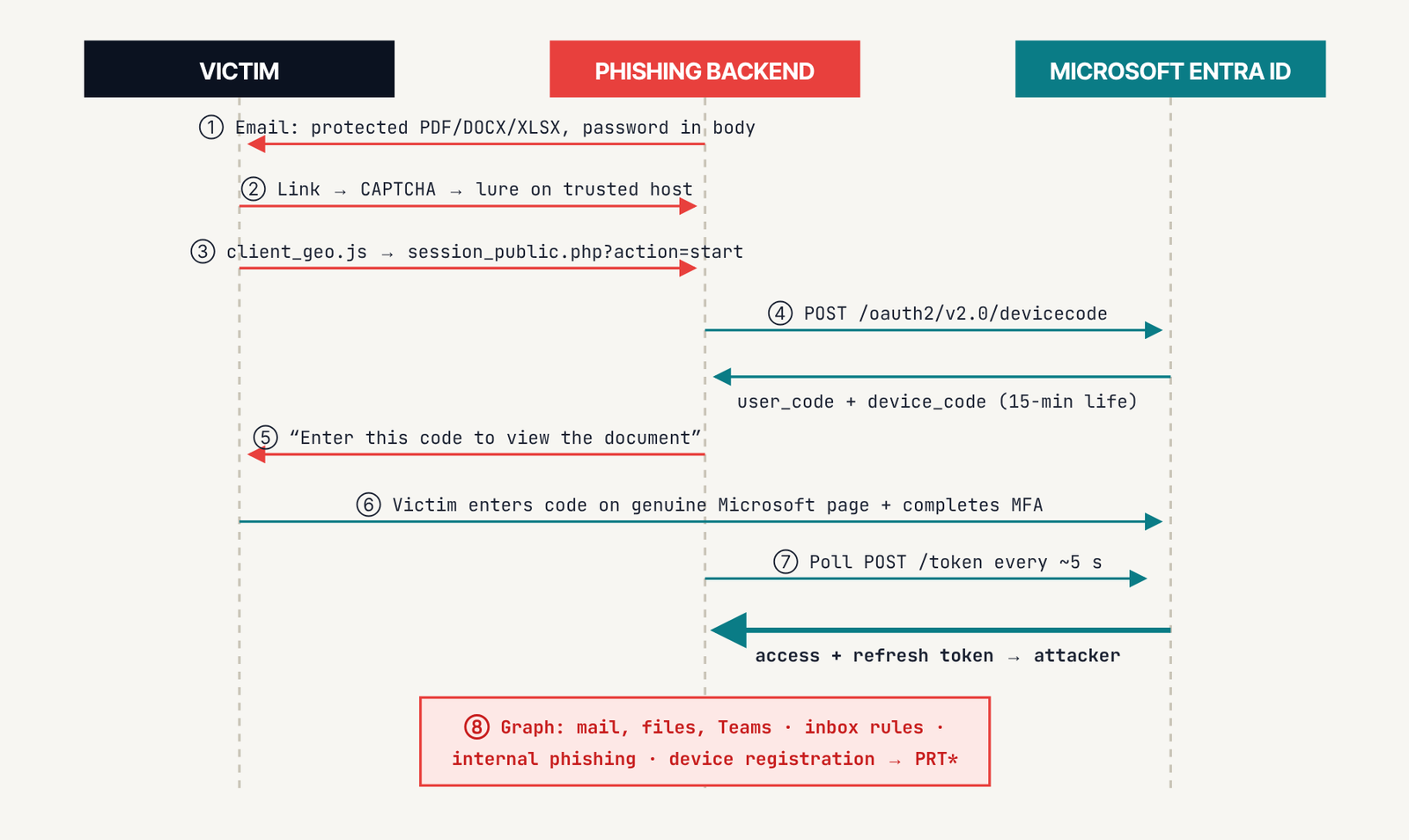
- The lure. A business-themed email (a commercial offer, contract, invoice or “confidential document”) carries a password-protected PDF, DOCX or XLSX, with the password in the email body. Password protection keeps email scanners from reading the file.
- The gate. The document link leads to a CAPTCHA page (Cloudflare Turnstile or a self-hosted widget). Some variants first show a decoy page on trusted platforms such as Google Sites, Miro, Zoom, Axure or Smartsheet, or on Cloudflare R2 or Linode storage.
- Victim profiling. The page loads
client_geo.js, looks up the visitor’s location through public IP-geolocation services, and calls the kit’s backend (session_public.php?action=start) to open a session. - The code. The attacker’s side requests a device code from Microsoft Entra ID. Codes issued this way expire after 15 minutes, which is why these kits work live, in real time.
- The instruction. The victim is told to enter the code on Microsoft’s page to “view the document”.
- The approval. The victim enters the code on Microsoft’s genuine device sign-in page and completes MFA.
- The handover. The backend polls every few seconds (
action=poll). As soon as the victim finishes, Microsoft issues an access token and a refresh token to the attacker. - The abuse. From here the attacker can act as the user within the account’s permissions: read mail and files, set inbox rules, send internal phishing, and in some campaigns register a device for persistence.
ANY.RUN also found an admin panel at /admin/index.php whose styling hints at Telegram MFA alerts, victim statistics and link generation. That is an inference from code, not a captured panel. It assesses with high confidence that SkyW4lker shares a developer with the Gabagool credential-phishing kit, first seen in April 2026.
Why MFA, even phishing-resistant MFA, doesn’t stop it
MFA proves that the person at the keyboard is the legitimate user, and in this attack they are. The authenticated session is then transferred to the device that requested the code. Passkeys and FIDO2 keys are satisfied too, because the victim uses them on the real Microsoft domain. Phishing-resistant MFA remains essential against classic credential phishing, but it is not the control for this one. Blocking the device code flow is.
What the attacker walks away with
| Token | What it means |
|---|---|
| Access token | Valid for roughly 60–90 minutes; up to about 28 hours where Continuous Access Evaluation applies |
| Refresh token | Valid until 90 days of inactivity and renewed on use, so access can quietly persist |
| Family refresh token (FOCI) | Can be redeemed for other Microsoft first-party apps, widening access beyond the original app |
| Primary Refresh Token (PRT) | If the attacker uses the Microsoft Authentication Broker to register a device, they can obtain a device-bound PRT that survives password resets until the device is removed |
The PRT path was documented in Microsoft’s reporting on Storm-2372, an actor that used device-code phishing from August 2024 and that Microsoft linked to Midnight Blizzard in July 2026. It has not been reported for SkyW4lker specifically, but defenders should assume any device-code compromise could escalate this way.
Indicators of compromise
Published by ANY.RUN (domains and IPs defanged):
| Type | Indicator |
|---|---|
| URL paths | /assets/js/client_geo.js, /assets/js/endpoint.js, /assets/js/url_helper.js, /assets/php/endpoints/session_public.php, /assets/php/endpoints/confirm_visit.php, /admin/index.php |
| Landing token | Regex it[A-Za-z0-9]{32}us (from 10 August 2026) |
| Domains | 173 published, e.g. 5200m[.]com, torvion[.]life, ghethim[.]com, priorispace[.]biz, flow505.mooo[.]com |
| IPs | 162.243.64[.]121, 67.205.154[.]32, 172.86.85[.]51 (shared with Gabagool) |
| Geo lookups | Lure pages calling ip-api[.]com, ipapi[.]co or ipwho[.]is |
Block the domains at your proxy and email gateway, but don’t rely on them: phishing domains rotate quickly. The behavioral signals below last longer.
How to detect device-code phishing in Microsoft Entra ID
Every device-code sign-in is labeled in Entra sign-in logs, and most users never need one, so a single hit deserves a look. These starting queries use Microsoft Sentinel’s SigninLogs table; validate field names in your workspace before alerting on them.
Hunt 1: all device-code sign-ins in the last 30 days
SigninLogs
| where TimeGenerated > ago(30d)
| where AuthenticationProtocol == "deviceCode"
| summarize Hits=count(), IPs=make_set(IPAddress),
    Apps=make_set(AppDisplayName), Risk=make_set(RiskLevelDuringSignIn)
    by UserPrincipalName, ResultType
| order by Hits desc
Hunt 2: later token use from sessions that began with a device code
SigninLogs
| where OriginalTransferMethod == "deviceCodeFlow"
| project TimeGenerated, UserPrincipalName, IPAddress, AppId,
    IncomingTokenType, UniqueTokenIdentifier
Hunt 3: Authentication Broker requesting device registration (the PRT path)
SigninLogs
| where AppId == "29d9ed98-a469-4536-ade2-f981bc1d605e"
| where ResourceIdentity == "01cb2876-7ebd-4aa4-9cc9-d28bd4d359a9"
| project TimeGenerated, UserPrincipalName, IPAddress,
    AuthenticationProtocol, IncomingTokenType
Signals that turn a hit into an incident:
- MFA completed from the user’s usual location, then tokens used minutes later from a hosting provider or VPN.
- Error 50199 followed by success within about five minutes (part of Microsoft’s Storm-2372 hunting logic).
- A user who has never used device code before, on a laptop that doesn’t need it.
- A new device registration or MFA method shortly after the sign-in.
- New inbox rules, mass mail access or internal phishing sent from the account.
Note: in Defender XDR advanced hunting, AADSignInEventsBeta was replaced by EntraIdSignInEvents on 19 October 2026, and the new table has no AuthenticationProtocol column. Use Sentinel or the Entra portal’s “Authentication protocol: Device code” filter instead.
How to block device code flow with Conditional Access
Microsoft treats the device code flow as high-risk and recommends blocking it wherever it isn’t needed. It requires Microsoft Entra ID P1.
- Audit first. Run Hunt 1 for 30 days and list legitimate users, typically Teams Rooms devices, Teams phones and panels, and shared kiosks.
- Create the policy. Users: All users. Target resources: All resources. Conditions → Authentication flows → Device code flow. Grant: Block access.
- Exclude narrowly. Put Teams resource accounts in a dedicated exclusion group, ideally limited to trusted named locations.
- Run in Report-only for one to two weeks, review the impact, then switch the policy On.
- Add a second policy that blocks Authentication transfer (the cross-device QR hand-off), which carries similar risk.
Blocked attempts return error AADSTS530036. Once a session is known to have started with device code, later refreshes of that session can be blocked too. The CIS Microsoft 365 Benchmark v6.0.1 (control 5.2.2.12) also calls for this block.
Check for the Microsoft-managed policy. Many tenants now contain a Microsoft-managed Conditional Access policy named “Block device code flow”, created in Report-only. Microsoft switches it on after at least 30 days, with two weeks’ notice, unless an admin turns it off. When enforced, it has signed out Teams Rooms on Android, Teams phones and panels that weren’t excluded, so review its exclusions now.
If you were hit: incident response steps
A password reset alone does not end this attack. Tokens, sessions and any attacker-registered device must all go.
# Microsoft Graph PowerShell (appropriate Entra admin role required)
$upn = "user@contoso.com"
Update-MgUser -UserId $upn -AccountEnabled:$false
Revoke-MgUserSignInSession -UserId $upn
Get-MgUserRegisteredDevice -UserId $upn
Update-MgDevice -DeviceId <id> -AccountEnabled:$false
Get-MgUserAuthenticationMethod -UserId $upn
Get-InboxRule -Mailbox $upn # Exchange Online PowerShell- Disable the account and revoke sessions. Revocation invalidates refresh tokens; apps that support Continuous Access Evaluation (Exchange, SharePoint, Teams, Graph) react within about 15 minutes. Other access tokens can remain valid for up to an hour.
- Disable or delete devices registered during the compromise window. This kills any Primary Refresh Token.
- Reset the password (twice in hybrid Active Directory) and remove any MFA methods you don’t recognize.
- Remove persistence: inbox and forwarding rules, OAuth app consents and mailbox delegates.
- Scope the impact with the unified audit log: mail read, files downloaded and messages sent from the account.
- Re-enable the account only after the Conditional Access block applies to it.
Know the limits of other controls. Token Protection binds tokens to the device they were issued to (generally available for native Exchange, SharePoint and Teams apps on Windows, iOS and macOS), but it cannot help if the attacker registered their own device. Requiring compliant devices for sensitive apps is stronger, because tokens on an unmanaged attacker machine then fail.
How to protect your staff
Never enter a code from an email, document, chat message or phone call into a Microsoft page. Real IT requests never work that way. If a document asks you to “verify” with a code, report it.
- Treat password-protected attachments with the password in the email body as suspicious.
- Restrict who can register or join devices to Microsoft Entra ID.
- Turn on sign-in risk and user risk policies, and keep Continuous Access Evaluation enabled.
- Check suspicious URLs with our free link checker and review email headers with the email header analyzer.
What we don’t know yet
ANY.RUN has not published which Microsoft client ID SkyW4lker requests, whether it generates a fresh code per victim, or who operates or sells the kit. Its analysis also contains small inconsistencies: it says the kit works without stealing passwords, yet one shared code module logs them, and it gives the US share as both 46% and 47%. No other vendor had published independent SkyW4lker research as of 28 October 2026.
Frequently asked questions
Does MFA protect against SkyW4lker?
No. The victim completes MFA on Microsoft’s real page, and the resulting session is handed to the attacker. Blocking the device code flow with Conditional Access is the effective control.
Is Microsoft’s login page compromised?
No. The page is genuine. SkyW4lker abuses a legitimate sign-in flow by persuading users to authorize a device they don’t control.
How do I know if device code flow is used in my tenant?
Filter Entra sign-in logs by authentication protocol “Device code”, or run Hunt 1 above in Microsoft Sentinel. Most organizations find very few legitimate uses.
Will blocking device code flow break anything?
It can affect Teams Rooms devices, Teams phones and panels, some shared kiosks and command-line tools that sign in with device code. Run the policy in Report-only first and exclude only the accounts that genuinely need it.
Sources
- ANY.RUN: SkyW4lker phishing kit analysis (27 Oct 2026)
- IETF RFC 8628: OAuth 2.0 Device Authorization Grant
- Microsoft Learn: block authentication flows with Conditional Access
- Microsoft Threat Intelligence: Storm-2372 device code phishing
- Volexity: Russian threat actors targeting Microsoft device code authentication
This article expands the SkyW4lker feature from the MAG212 CYBER October 28, 2026 Intelligence Edition, which also covers the Node.js Brotli flaw, Oracle EBS CVE-2026-101767, Magento PolyShell and Tailscale SSH.