
SignDrop: A Public Windows Exploit Uses Microsoft Defender’s Privileges to Reach SYSTEM, and There’s No Patch Yet
The researcher known as Nightmare Eclipse has released another Windows zero-day, and this one turns Microsoft’s own antivirus into the helper. SignDrop lets a standard local user become SYSTEM by combining a quirk in how the Windows Common Log File System signs log files with Microsoft Defender’s signature-update interface. Security firm Cyderes compiled and tested the proof of concept. There is no CVE, no fix and, so far, no sign of exploitation in the wild.
What happened
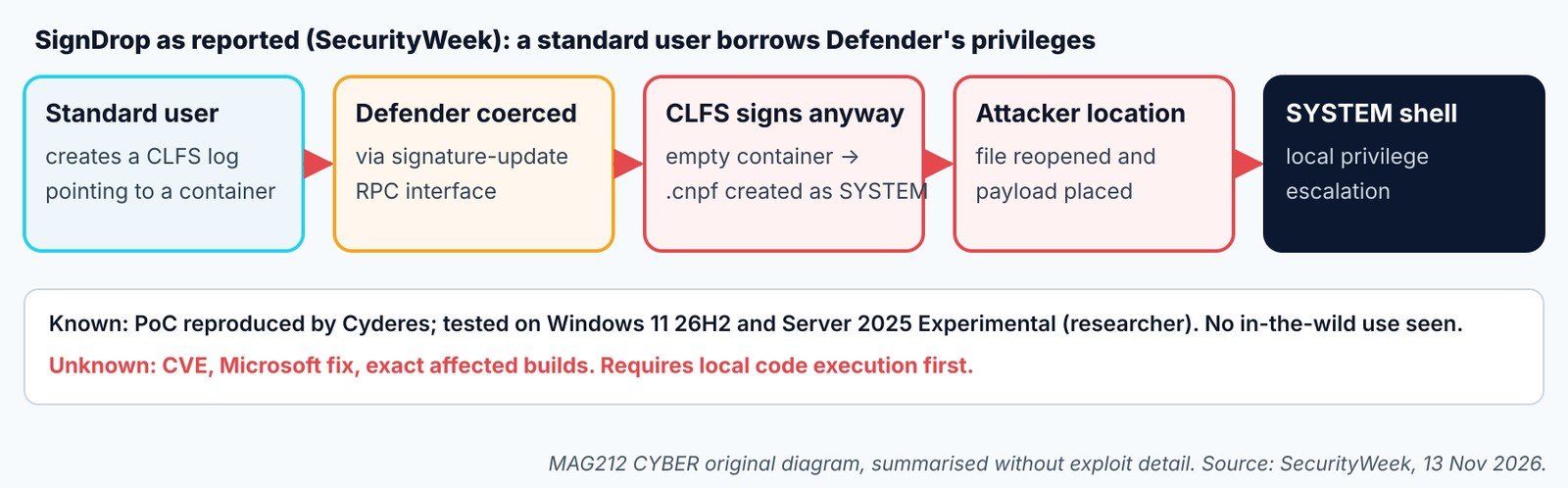
[Reported] Researcher Abdelhamid Naceri (“Nightmare Eclipse”) released SignDrop this week. It lets a local, standard user become SYSTEM by abusing how the Common Log File System (clfs.sys) creates its .cnpf authentication file. Cyderes compiled and tested the proof of concept and has seen no exploitation in the wild. SecurityWeek asked Microsoft for comment. (SecurityWeek) [Unknown] At our cutoff we found no Microsoft advisory, CVE or fixed build.
Who is affected and how it works
[Reported] The researcher says he tested it on Windows 11 26H2, Windows 11 26H2 Experimental and Windows Server 2025 Experimental. He claims it works on most Windows installations and that you’re “generally vulnerable” if Windows is older than 90 days; neither claim is verified. The trick: if a log’s container is empty, CLFS signs it whether or not a signature file exists. A user can point a log at a chosen path, make Defender open it through its signature-update interface, and so get a SYSTEM-owned file created where they choose. (SecurityWeek) [MAG212 analysis] This doesn’t let anyone in from outside: an attacker first needs code running as a user, from phishing or a stolen login. That’s exactly when ransomware crews want SYSTEM.
Inventory what you’ll need when Microsoft responds
OS: Windows 10/11, Server 2019+ · Shell: PowerShell 5.1 · Privileges: standard user · READ-ONLY
# OS build and update revision (UBR)
$cv = Get-ItemProperty 'HKLM:\SOFTWARE\Microsoft\Windows NT\CurrentVersion'
'{0} {1}.{2}' -f $cv.DisplayVersion, $cv.CurrentBuild, $cv.UBR
# Defender platform and engine versions
Get-MpComputerStatus | Select-Object AMProductVersion, AMEngineVersion, AntivirusSignatureLastUpdated
Record these per device so you can match them to Microsoft’s fix when it ships. Commands not tested by MAG212 CYBER.
Contain, remediate and prevent
- Keep Windows and Defender platform updates current, and watch the Microsoft Security Response Center for a SignDrop advisory.
- [MAG212 analysis] Hunt: look for Defender processes (
MsMpEng.exe) creating files in user-writable folders, followed by a new SYSTEM-level process, service or scheduled task started from that location. - Reduce the first step: no local admin for daily use, application control on workstations, and fast isolation for any machine running unknown code.
Verify recovery: once Microsoft ships a fix, confirm the build and UBR across the fleet and re-run your hunt over the period before patching.
Putting the risk in proportion
[MAG212 analysis] SignDrop is a local privilege escalation: it doesn’t let anyone in from the internet. An attacker first needs code running on the machine as an ordinary user, through phishing, a malicious download or stolen credentials. That is a real step, but it is exactly the step most intrusions already achieve. Privilege escalation is how they go from one user’s files to disabling security tools and spreading.
[Reported] The researcher claims the exploit works on most Windows installations and that systems older than 90 days are generally vulnerable. Neither claim has been independently verified, and he tested it on a small set of builds. Until Microsoft publishes an advisory, the safest assumption is that supported Windows versions are affected.
[MAG212 analysis] Public exploits like this tend to be adopted by ransomware crews and red teams quickly, because they are free and reliable. The window between release and a Microsoft fix is when behavioural detection matters most.
Why it matters
Almost every Windows machine runs Microsoft Defender, so a privilege escalation that abuses it has a very wide footprint. With working code public and no patch, defenders have to rely on reducing the first step, catching the abnormal behaviour, and being ready to patch quickly when Microsoft responds.
The bottom line
Keep Windows and Defender platform updates current and watch the Microsoft Security Response Center for a SignDrop advisory. In the meantime, record OS builds and Defender versions across the fleet, hunt for Defender creating files in user-writable folders followed by new SYSTEM-level processes or tasks, and keep daily accounts free of local admin rights.
How we label evidence: [Confirmed] comes from a primary source such as a vendor or CISA; [Reported] from a secondary outlet; [Claimed] from an attacker or an unverified party; [MAG212 analysis] is our judgement; [Unknown] means not established at press time. Commands and indicators are copied from the cited sources and were not tested by MAG212 CYBER.
This story is part of MAG212 CYBER Daily, 13 November 2026, with the day’s other verified stories, the Defender’s Action Desk and a full source register. Get the daily briefing free: subscribe to MAG212 CYBER. By El Mostafa Ouchen.