
Fake GitHub ‘Security Tools’ Use Hidden Build Hooks to Drop AsyncRAT and Infostealers on 2,000+ PCs
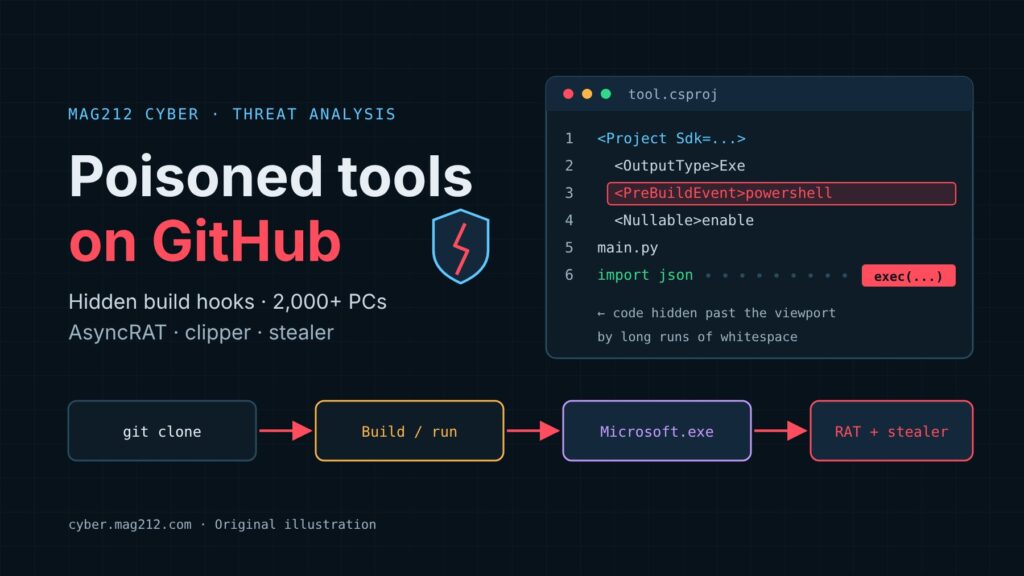
For about two years, one unnamed threat actor has seeded GitHub with trojanized projects. Its lures have moved from crypto-game bots and cheats to fake “security tools” aimed at pentesters, SOC analysts and security developers. Doctor Web says more than 2,000 Windows PCs were infected when it did its research. Building or running one of these repositories was enough to install a heavily evasive Electron loader, which then delivered AsyncRAT, a crypto clipper and a Telegram-exfiltrating stealer. Security professionals keep VPN profiles, SSH/FTP client configs and client credentials on their workstations, and that is exactly what this malware collects.
| What | Trojanized GitHub repositories posing as security utilities, game bots and crypto tools |
| Reported | Doctor Web report dated 5 November 2026; BleepingComputer coverage 6 November 2026 |
| Actor | A single, unattributed actor; first repositories appeared about two years ago |
| Scale | More than 2,000 Windows PCs infected at the time of Doctor Web’s research (vendor figure, not independently verified) |
| Trigger | Visual Studio PreBuildEvent in .csproj, PowerShell in .suo, or whitespace-hidden code in .py/.go files |
| Malware | Trojan.Loader.3261 (Microsoft.exe), BackDoor.AsyncRAT.115, Trojan.Clipper.688, JS.Stealer.191 |
| CVE | None. This is social engineering plus abuse of build features, not a vulnerability |
| IOCs | 17 SHA-1 hashes, 4 domains, 2 IPs, 9 example repositories in DoctorWebLtd/malware-iocs |
What happened
Doctor Web found malicious code in Visual Studio projects hosted in infected GitHub repositories. The first wave targeted crypto-wallet users with blockchain-game projects, game bots and cheats. One lure was tied to Catizen, a Telegram-based game platform, and came with step-by-step Visual Studio instructions written for less technical users. The actor later switched to projects that claim to automate scanning, security testing and log analysis. One example, reported by BleepingComputer, presented itself as a lightweight tool for parsing, cleaning and formatting output from the Fscan network scanner. Doctor Web’s IOC list names it Trivexqbk/FscanOutput-Beautify, alongside eight other example repositories.
How the attack works
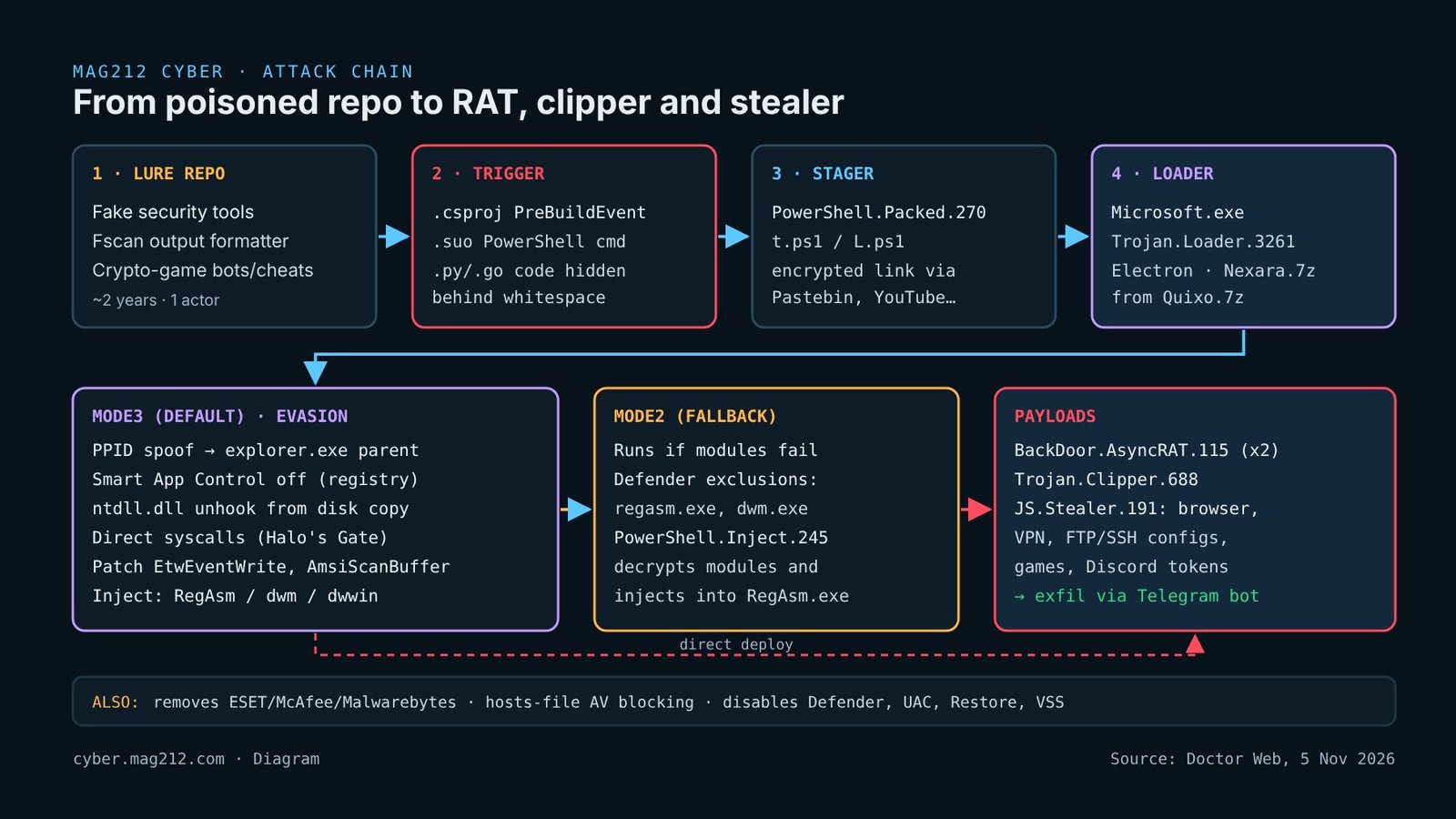
Stage 0: the trigger. Early repositories shipped a .csproj with a PreBuildEvent. Visual Studio runs that event before compilation, so pressing Build runs the attacker’s command. Some repositories also carried .suo (solution user options) files that contained a PowerShell command. In the later security-tool lures, Python and Go files hid the payload with what Doctor Web calls “malicious code concealed behind a large number of whitespaces”. The malicious statement sits far to the right of an innocent line, past the edge of a browser or editor viewport.
Stage 1: PowerShell.Packed.270. The script is written to C:\Users\Public\Pictures\t.ps1 or L.ps1. It does not hard-code its next hop. It reads an encrypted string from attacker servers or from legitimate services (Pastebin, YouTube, Telegram, Google Docs, GitCode) and decrypts it into a download link for Quixo.7z. That archive is pulled from attacker infrastructure or a GitHub release and unpacked to C:\ProgramData\Windows.Microsoft.Photos.
Stage 2: Trojan.Loader.3261. Microsoft.exe is a modular Electron application (version 1.4.5 at the time of analysis). It downloads Nexara.7z, which holds the encrypted modules and a config, and reports system information to a Telegram bot. It escalates privileges and disables Defender, UAC, notifications, System Restore and VSS. It removes ESET, McAfee and Malwarebytes if they are installed, and edits the hosts file to block antivirus vendors’ domains. It also deletes other files in drivers\etc, which defeats users who keep copies of the hosts file there.
Deployment runs in one of two main modes. Mode3 (default) does the following:
- Parent PID spoofing, so the process appears to be a child of
explorer.exe. - Disables Smart App Control by changing the
VerifiedAndReputablePolicyStateregistry value. - Unhooks
ntdll.dllby restoring a clean copy from disk over EDR hooks. - Makes direct syscalls with Halo’s Gate-style SSN resolution.
- Patches
EtwEventWriteandAmsiScanBufferin memory. - Injects the
boot_f,kernel_fandthread_fmodules intoRegAsm.exe,dwwin.exeordwm.exe.
If those modules fail, Mode2 takes over. It adds Defender exclusions for regasm.exe and dwm.exe, then drops a randomly named PowerShell script (PowerShell.Inject.245) in the temp folder. That script decrypts the modules and injects them into RegAsm.exe. Doctor Web also describes a less documented “Mode3non” variant and a legacy “Handler” path.
Stage 3: payloads.
- BackDoor.AsyncRAT.115: two identical copies on different ports, so two operators can control one host.
- Trojan.Clipper.688: injected by Trojan.InjectNET.14. It swaps wallet addresses on the clipboard and sends screenshots, window titles, user login and IP address to Telegram.
- JS.Stealer.191: an Electron stealer that checks for VMs and sandboxes. It takes browser data, FileZilla XML,
MobaXterm.ini, Total Commanderwcx_ftp.ini, VPN settings, messenger files, gaming accounts and Discord tokens, then exfiltrates them through a Telegram bot.
Doctor Web also found an unfinished Electron component, Lodge.7z, which contains WUDFHost.exe. Its code points to future features: a service created with sc.exe, and re-downloading Microsoft.exe if it is deleted. The project is still being developed.
Editorial ATT&CK mapping (MAG212, not published by Doctor Web): T1134.004 parent PID spoofing; T1562.001 impair defenses; T1562.006 indicator blocking (ETW); T1055 process injection; T1115 clipboard data; T1567 exfiltration over a web service.
Indicators and detection
The full set is in Doctor Web’s malware-iocs repository, under Trojan.Loader.3261/README.adoc. It lists 17 SHA-1 hashes, plus delivery URLs that abuse Pastebin, YouTube, Telegram, Google Docs and GitCode. The network indicators are:
- Domains: muckanthropic[.]com, muckcoding[.]com, muckdeveloper[.]com, muckduck.duckdns[.]org
- IPs: 130.12.182[.]172, 130.12.182[.]209
- Host artifacts:
C:\Users\Public\Pictures\t.ps1/L.ps1,C:\ProgramData\Windows.Microsoft.Photos\,Nexara\manifest\config.json,thumbcache_*.dll
MAG212 recommendation: run a quick triage on any analyst or developer workstation that may have built third-party tools. Doctor Web does not give the full Smart App Control key path. The one below is where Windows normally stores that value.
# Host artifacts named by Doctor Web
'C:\Users\Public\Pictures\t.ps1','C:\Users\Public\Pictures\L.ps1',
'C:\ProgramData\Windows.Microsoft.Photos' | ForEach-Object { "{0} : {1}" -f $_, (Test-Path $_) }

# Defender exclusions added in Mode2 (look for regasm.exe / dwm.exe)
(Get-MpPreference).ExclusionProcess

# Smart App Control state (0 = off)
Get-ItemProperty 'HKLM:\SYSTEM\CurrentControlSet\Control\CI\Policy' -Name VerifiedAndReputablePolicyState

# Hosts file entries redirecting security-vendor domains
Select-String -Path C:\Windows\System32\drivers\etc\hosts -Pattern 'eset|mcafee|malwarebytes'
In EDR or SIEM, look for these patterns. MSBuild.exe or devenv.exe spawning powershell.exe. RegAsm.exe, dwm.exe or dwwin.exe making outbound connections. Non-browser processes calling api.telegram[.]org. Unexpected Electron binaries running from C:\ProgramData.
Vetting and building third-party GitHub tools safely
Doctor Web’s own advice is short. Keep signatures current, scan everything you download, including repositories, and treat security tooling like any other untrusted code. The steps below are MAG212 recommendations that build on that advice.
1. Hunt build hooks before opening the solution. Clone the repository without opening it in Visual Studio, then search the MSBuild files:
# PowerShell
Get-ChildItem .\repo -Recurse -Include *.csproj,*.vcxproj,*.vbproj,*.props,*.targets,*.sln |
  Select-String -Pattern 'PreBuildEvent|PostBuildEvent|<Exec |powershell|-enc' |
  Select-Object Path, LineNumber, Line

# Linux/macOS
grep -rnEi 'PreBuildEvent|PostBuildEvent|<Exec |powershell|-enc' \
  --include='*.csproj' --include='*.vcxproj' --include='*.props' --include='*.targets' ./repo
2. Hunt for whitespace padding. Legitimate code rarely has 100+ consecutive spaces or tabs followed by more code on the same line:
# PowerShell: runs of 100+ whitespace characters followed by code
Get-ChildItem .\repo -Recurse -File -Include *.py,*.go,*.cs,*.ps1,*.js,*.csproj |
  Select-String -Pattern '[ \t]{100,}\S' |
  Select-Object Path, LineNumber, @{n='LineLength';e={$_.Line.Length}}

# grep equivalent, plus a long-line report
grep -rnE '[[:blank:]]{100,}[^[:blank:]]' --include='*.py' --include='*.go' --include='*.cs' ./repo
find ./repo -type f \( -name '*.py' -o -name '*.go' \) -exec awk 'length > 300 {print FILENAME": line "FNR" ("length" chars)"}' {} +- 3. Strip per-user files.
.suofiles and the.vs\folder are per-user state and almost never belong in a public repository. Treat their presence as a red flag and delete them before you open the solution. - 4. Read diffs, not the rendered page. Use
git diff, or an editor with word-wrap and visible whitespace. GitHub’s web view and narrow editor panes are exactly what this concealment relies on. - 5. Check provenance. Look for throwaway accounts with no history, keyword-stuffed repo names, inflated stars, a single bulk commit, and “tools” that wrap a well-known project (Fscan, FRP) without linking upstream. Prefer the upstream project or a vendor-signed release.
- 6. Build in a disposable VM. Use a non-persistent VM or Windows Sandbox with no corporate credentials, no mapped drives, no browser profiles and no VPN configs. Restrict its egress, or route it through a logging proxy, and revert to a snapshot after every build. Keep in mind that JS.Stealer.191 checks for VMs, so a clean sandbox run proves nothing.
- 7. Separate tooling from secrets. Never build untrusted code on the machine that holds client VPN profiles, MobaXterm/FileZilla sessions or password vaults.
What to do now
- Block and sweep: add the four domains and two IPs to DNS and proxy blocklists, and search 90 days of logs for them.
- Hash-hunt: load the 17 SHA-1 hashes from the IOC repository into EDR.
- If a host is hit (MAG212 recommendation): treat it as fully compromised. The loader dismantles AV, VSS and System Restore, so reimage the machine rather than cleaning it in place. Then rotate everything the stealer targets from a clean device: browser-saved passwords and sessions, VPN credentials, FTP/SSH client secrets, Discord tokens and any client credentials. Check crypto transactions for swapped addresses.
- Policy (MAG212 recommendation): require that tooling from GitHub be built only in an approved sandbox, and alert when a build tool spawns PowerShell.
What we still don’t know
Doctor Web gives no geography for the infections, no attribution, no total number of repositories (the IOC file lists nine examples) and no takedown status. MAG212 did not open the listed repositories to check whether they are still live. The 2,000-PC figure comes only from Doctor Web. The current loader’s persistence mechanism is not documented. The ATT&CK mapping above is ours.
Related on MAG212 CYBER
Sources
- Doctor Web: “Insolence beyond belief. Threat actors target information security developers on GitHub” (5 November 2026)
- Doctor Web on GitHub: Trojan.Loader.3261 indicators of compromise (accessed 8 November 2026)
- BleepingComputer: “Fake security tools on GitHub push backdoors and infostealers” (Bill Toulas, 6 November 2026)
Written and edited by El Mostafa Ouchen for MAG212 CYBER. Facts verified against the sources above as of 8 November 2026.