
The Outage Is Over, the Outage-Themed Phishing Is Not: Hunting the EX1550543 Lures
From the MAG212 CYBER Daily, 15 November 2026. Every command is copied from official documentation or the cited analysis and was not tested by MAG212; run it only on systems you are authorised to administer.
Status: Campaign confirmed by Microsoft Threat Intelligence. Microsoft says the activity is consistent with credential phishing but has not confirmed that credentials were collected or malware delivered. It targeted organisations across several US sectors. [1][2][3]
What happened
A Microsoft 365 disruption that began on 12 November hit Exchange Online mailboxes, Outlook, Teams and dependent services across regions. Microsoft attributed it to several servers becoming unavailable, extended email timeouts to 48 hours to preserve delayed messages, and restored service to remaining customers by 14 November. [2]
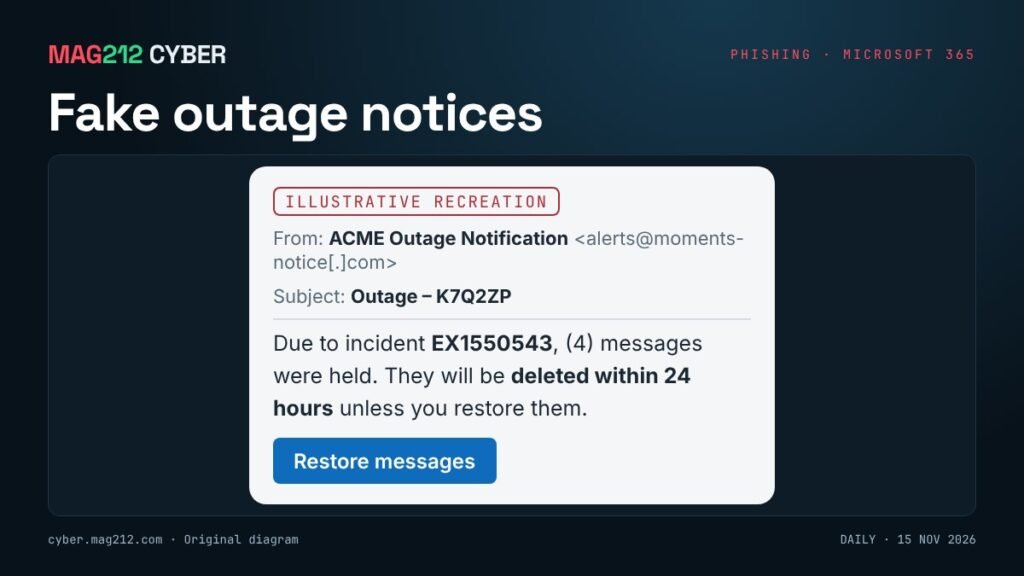
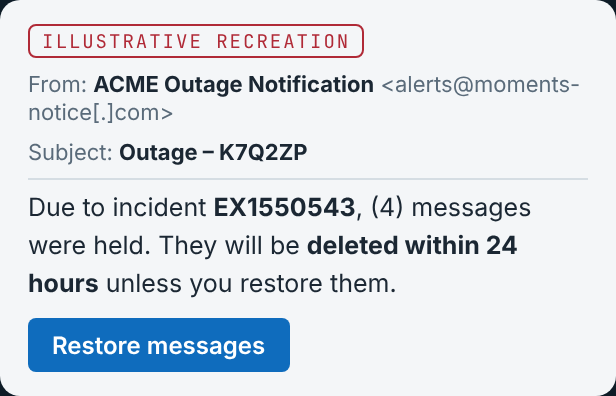
Microsoft Threat Intelligence then warned that attackers were sending emails impersonating Microsoft 365 service-health notifications that referenced the genuine Exchange Online incident, EX1550543. On 13 November Microsoft detected messages falsely claiming that emails had been held during the outage and would be deleted within 24 hours unless the recipient clicked a link to restore them. [1][2][3]
Why this matters
Real incidents make fake notices believable. These emails quote a genuine incident ID and arrive while users are already confused by missing mail, which is exactly when verification habits slip. (MAG212 analysis)
Anatomy of the lure
| Element | Detail |
|---|---|
| Display name | Organisation-specific prefix plus “Outage Notification” or “Service Health” |
| Subject | “Outage – ” followed by a six-character code |
| Sender domains | moments-notice[.]com, planetmaison[.]com, newbooker[.]com |
| Hook | Held messages to be deleted within 24 hours |
| Credibility | Quotes the real incident ID EX1550543 |
Details from Microsoft’s warning as reported in [2] and [3]. The image above is an illustrative recreation, not an actual phishing email.
Who is affected
Microsoft 365 users in organisations across several US sectors, according to Microsoft. Any organisation affected by the outage is a plausible target, because the lure matches what users saw. [2]
What defenders should look for
- Emails from the three sender domains, or with “Outage” subjects and service-health display names, from outside your organisation.
- Safe Links click-throughs on those messages.
- Sign-ins from unfamiliar locations, new MFA methods or new inbox rules for users who clicked.
Command reference
Hunt the lures and the clicks
KQL, Microsoft Defender XDR advanced hunting · requires Defender for Office 365 and security reader rights · read-only · not tested by MAG212
let lures = EmailEvents
| where Timestamp > datetime(2026-11-12)
| where SenderFromDomain in~ ("moments-notice.com", "planetmaison.com", "newbooker.com")
    or (Subject has "Outage" and SenderDisplayName has_any ("Outage Notification", "Service Health"));
lures | project Timestamp, RecipientEmailAddress, SenderFromAddress, Subject, DeliveryAction;
// who clicked through Safe Links:
UrlClickEvents | where Timestamp > datetime(2026-11-12)
| join kind=inner (lures | project NetworkMessageId) on NetworkMessageId
| project Timestamp, AccountUpn, Url, ActionType, IsClickedThrough
Run the two statements separately if your console shows only the last result. Internal “outage” emails may match the subject filter, so check senders. The EmailEvents and UrlClickEvents tables are documented in Microsoft’s advanced hunting schema. [5]
Contain and remediate (in order)
- Search and purge matching messages from mailboxes.
- For every user who clicked through: reset the password, revoke sessions, review MFA methods and remove suspicious inbox rules.
- Block the three sender domains after confirming they match your telemetry.
- Check that Safe Links policies cover all users, as Microsoft recommends. [2]
Verify recovery
- No further deliveries from the sender domains.
- No new sign-ins from unfamiliar locations for affected users over the following week.
- Inbox rules and MFA methods for affected users reviewed and confirmed.
Prevention and awareness
Microsoft publishes outage updates on the Microsoft 365 admin center Service health page, not by emailing end users. Tell staff to confirm any outage message with IT and never to restore mail through a link in an email. [2][4]
Related on MAG212 CYBER
- MAG212 CYBER Daily, 15 November 2026: Machine speed, human gaps (full issue and PDF)
- MAG212 CYBER Weekly, 14 November 2026
- Subscribe free to MAG212 CYBER
Sources
- [1] CybersecurityNews, “Microsoft warns of active password stealing attack exploiting the Microsoft 365 service disruption“, 14 Nov 2026.
- [2] The Tribune (ANI), “Microsoft restores 365 services globally; warns of phishing campaign exploiting outage“, 14 Nov 2026.
- [3] TVC News, “Microsoft warns of phishing campaign exploiting Microsoft 365 service disruption“, 14 Nov 2026.
- [4] HawkEye, “Microsoft 365 outage advisory: the phishing started before the service came back“, 14 Nov 2026.
- [5] Microsoft Learn, “Advanced hunting schema tables (EmailEvents, UrlClickEvents)“, docs 2026.
Written and edited by El Mostafa Ouchen for MAG212 CYBER. Facts checked against the sources above as of 15 November 2026, 7:45 AM PST.