
GeoVision GV-VMS Exploited to Plant an XMRig Miner at 13 Organisations: Attack Chain, IoCs and Hunting Commands
From the MAG212 CYBER Daily, 16 November 2026. Every command is copied from official documentation or the cited analysis and was not tested by MAG212; run it only on systems you are authorised to administer.
Status: Exploitation observed by Huntress at 13 organisations, mostly between 8 and 10 November 2026. The specific vulnerability used is not identified. GeoVision’s fixed release is V17.4.8.58. [1][2]
What happened
Huntress responded to a cluster of intrusions in which every case began with a service belonging to GeoVision GV-VMS, a Windows video management system used to run IP cameras. The affected hosts ran GV-VMS 17.4.8.0, a build compiled on 24 April 2024. Shodan searches of the victims’ external IP addresses found exposed GeoVision devices and management interfaces. [1][2]
GeoVision’s April 2026 advisory lists three unauthenticated remote code execution vulnerabilities in the WebCam Server function of that version. Huntress has not determined which one the attackers used. Older GeoVision flaws exploited in the wild, CVE-2024-6047 and CVE-2024-11120, affected end-of-life embedded devices and are not confirmed for this campaign. [2]
Who is affected
- GV-VMS installations older than V17.4.8.58, particularly where the WebCam Server or management interface is reachable from untrusted networks. [2]
- Organisations where cameras are managed by facilities teams or an outside installer and the VMS server is not in IT’s patch or monitoring scope.
Why this matters
Camera and access-control software is often installed by a security integrator, runs as SYSTEM and sits outside IT's patch cycle. This campaign was "only" cryptomining, but the loader can fetch other payloads, and the same foothold could be sold to a ransomware crew. (MAG212 analysis)
How the attack works
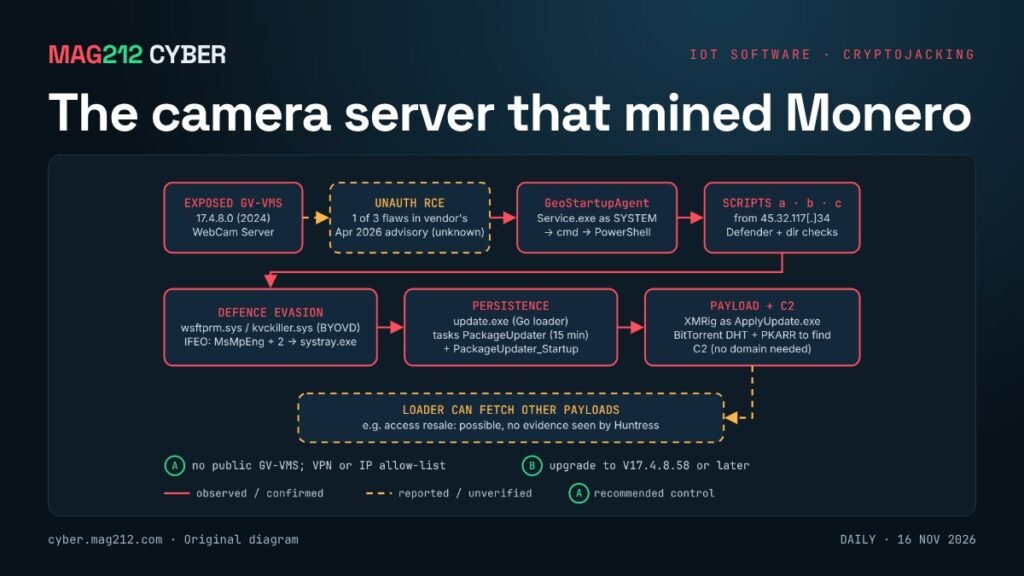
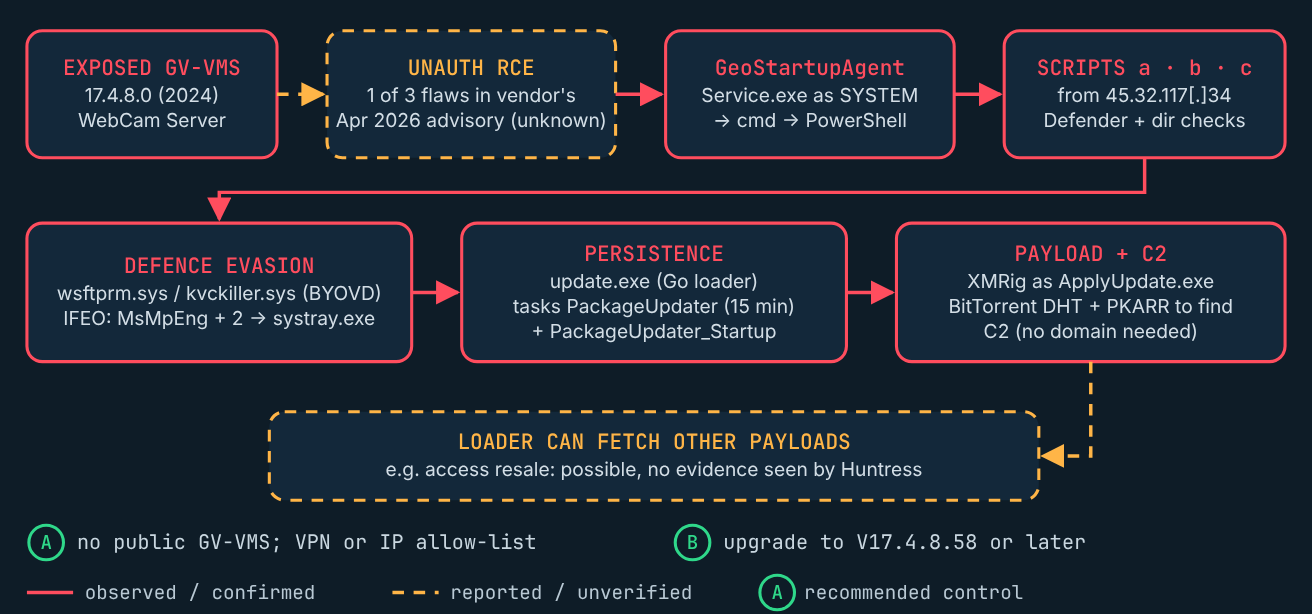
Huntress reconstructed the following chain. [1]
- Entry: exploitation of an unauthenticated flaw in the GV-VMS WebCam Server (which one is unknown). Huntress saw
WebCamServer.execontact 2.59.133[.]151, the likely exploitation source. - Execution:
GeoStartupAgentService.exe, usually running asNT AUTHORITY\SYSTEM, spawnedcmd.exe, which ran PowerShell to download a script from 45.32.117[.]34. - Reconnaissance: scripts
a,bandcchecked for writable directories and whether Defender was running;bwas written to disk and run through WMI. - Defence evasion: a vulnerable driver,
wsftprm.sys(also seen askvckiller.sys), previously abused in bring-your-own-vulnerable-driver attacks, was downloaded to tamper with antivirus. Image File Execution Options “Debugger” values redirectedMsMpEng.exe,SecurityHealthService.exeandSecurityHealthSystray.exetosystray.exe, so they would not start. - Persistence: a Go loader,
update.exe, was placed inC:\Windows\System32\config\systemprofile\with scheduled tasksPackageUpdater(every 15 minutes) andPackageUpdater_Startup(at boot, as SYSTEM). - Payload and C2: the loader dropped XMRig as
ApplyUpdate.exe. It uses a BitTorrent Mainline DHT client and a PKARR resolver to find its server, so the operator can move infrastructure without a domain.
Huntress notes the loader can fetch other payloads, which could support uses such as selling access, but found no evidence of that in these incidents. [1][2]
Indicators of compromise
| Type | Indicator | Note |
|---|---|---|
| IP | 45.32.117[.]34 | Hosts PowerShell scripts |
| IP | 156.246.94[.]183 | Loader C2 |
| Domain | cctv-update[.]top | Resolved to the C2; registered 7 Nov 2026 |
| IP | 2.59.133[.]151 | Likely exploitation source |
| SHA-256 | f1235751c9e48e5732b7b183dc2bb175a19e4c6401dfd0e96b4cfdd0d8c54b4c | update.exe loader |
| SHA-256 | ff5dbdcf6d7ae5d97b6f3ef412df0b977ba4a844c45b30ca78c0eeb2653d69a8 | wsftprm.sys / kvckiller.sys |
| SHA-256 | b673c4d707828abedc767a2be6badef7454492e62c37e30cf3cc5a402fd3647b | scripts a, b, c |
| Tasks | PackageUpdater, PackageUpdater_Startup | Persistence |
These are single-vendor indicators from Huntress; infrastructure may be reassigned, so vet before blocking. [1]
What defenders should look for
cmd.exeorpowershell.exelaunched byGeoStartupAgentService.exe. [1]schtasks /Createlaunched byupdate.exe.- DNS queries sent directly to 8.8.8.8, 8.8.4.4 or 1.1.1.1 by processes other than the DNS client.
- Outbound UDP DHT traffic (port 6881 or similar) from
WebCamServer.exe. - Defender stopped or failing to start, and sustained high CPU on the VMS host.
False positives: some applications use public DNS resolvers or BitTorrent-style updates. Correlate with the parent process and the GeoVision service before acting.
How to investigate
The following checks are read-only. Run them in an elevated PowerShell 5.1+ session on the GV-VMS host. They use Get-CimInstance and Get-ScheduledTask, documented by Microsoft. Not tested by MAG212. [3][4]
Processes currently running under the GeoVision service:
$svc = Get-CimInstance Win32_Process -Filter "Name='GeoStartupAgentService.exe'"
Get-CimInstance Win32_Process |
  Where-Object { $svc.ProcessId -contains $_.ParentProcessId } |
  Select-Object ProcessId, Name, CommandLine
This only sees live processes. For history, search Sysmon Event ID 1 or Security Event 4688 (with command-line auditing enabled) for that parent process.
Persistence and evasion artefacts:
$k = 'HKLM:\SOFTWARE\Microsoft\Windows NT\CurrentVersion\Image File Execution Options'
'MsMpEng.exe','SecurityHealthService.exe','SecurityHealthSystray.exe' | ForEach-Object {
  Get-ItemProperty "$k\$_" -Name Debugger -ErrorAction SilentlyContinue |
    Select-Object PSChildName, Debugger }
Get-ScheduledTask -TaskName 'PackageUpdater*' -ErrorAction SilentlyContinue |
  Select-Object TaskName, State, @{n='Run';e={$_.Actions.Execute}}
Test-Path "$env:windir\System32\config\systemprofile\update.exe"
Get-CimInstance Win32_SystemDriver | Where-Object { $_.PathName -match 'wsftprm|kvckiller' }
Any Debugger value on those three processes, a PackageUpdater task, True for the loader path, or a matching driver means the host is compromised. No output is not proof that the host is clean.
How to contain and remediate
- Isolate the host and preserve evidence first: memory, task XML, the loader and logs, before deleting anything, as Huntress advises. [1]
- Block the indicators at the firewall and DNS filter.
- Remove the IFEO Debugger values, both scheduled tasks,
update.exe,ApplyUpdate.exeand the driver; re-enable Defender with tamper protection. - Reset credentials stored or used on the host, including VMS administrator and service accounts.
- Upgrade GV-VMS to V17.4.8.58 or later. If you cannot be sure the host is clean, rebuild it. [2]
- Put GeoVision devices and management interfaces behind a VPN or restrict them to trusted IP addresses. [1]
How to verify recovery
- GV-VMS reports V17.4.8.58 or later, and the WebCam Server is not reachable from the internet.
- Defender is running; the IFEO values, tasks, loader and driver are gone.
- No traffic to the indicators, CPU is back to baseline, and cameras record normally.
Prevention and awareness
- Administrators: put camera, access-control and building software in the asset inventory and patch schedule like any other server.
- Security teams: alert on shells spawned by appliance services; they rarely have a legitimate reason.
- Decision-makers: every system installed by a contractor needs an IT owner.
Related on MAG212 CYBER
- MAG212 CYBER Daily, 16 November 2026: The boxes nobody patches (full issue and PDF)
- MAG212 CYBER Daily, 15 November 2026: Machine speed, human gaps
- MAG212 CYBER Weekly, 14 November 2026
- Subscribe free to MAG212 CYBER
Sources
- [1] Huntress, “GeoVision camera software exploited to deploy XMRig cryptominer“, 13 Nov 2026.
- [2] Help Net Security, “Unpatched GeoVision camera software gave cryptojackers a side door into 13 organizations“, 16 Nov 2026.
- [3] Microsoft Learn, “Get-CimInstance (CimCmdlets)“, docs 2026.
- [4] Microsoft Learn, “Get-ScheduledTask (ScheduledTasks)“, docs 2026.
Written and edited by El Mostafa Ouchen for MAG212 CYBER. Facts checked against the sources above as of 16 November 2026, 6:00 AM PT.