
Microsoft 365 Outage Enters Day Two: What Microsoft Has Said, What It Hasn’t and What IT Teams Should Do
On Friday morning, Microsoft’s public status page still showed Microsoft 365 business and consumer services as degraded, more than a day after Outlook and Exchange Online problems began. Microsoft has frozen changes, rolled back a recent network update and added capacity, and it says it has found no malicious activity. What it has not done is name a root cause. This article updates our 12 November coverage with what changed overnight and what to do while the incident remains open.
| Incidents | EX1550543 (Exchange Online) · MO1550821 (dependent services) |
| Status 14:00 UTC Fri | Service degradation, business and consumer |
| Cause | Not confirmed; secure-connection process overloaded |
| Next | Post-incident report promised after mitigation |
What changed since yesterday
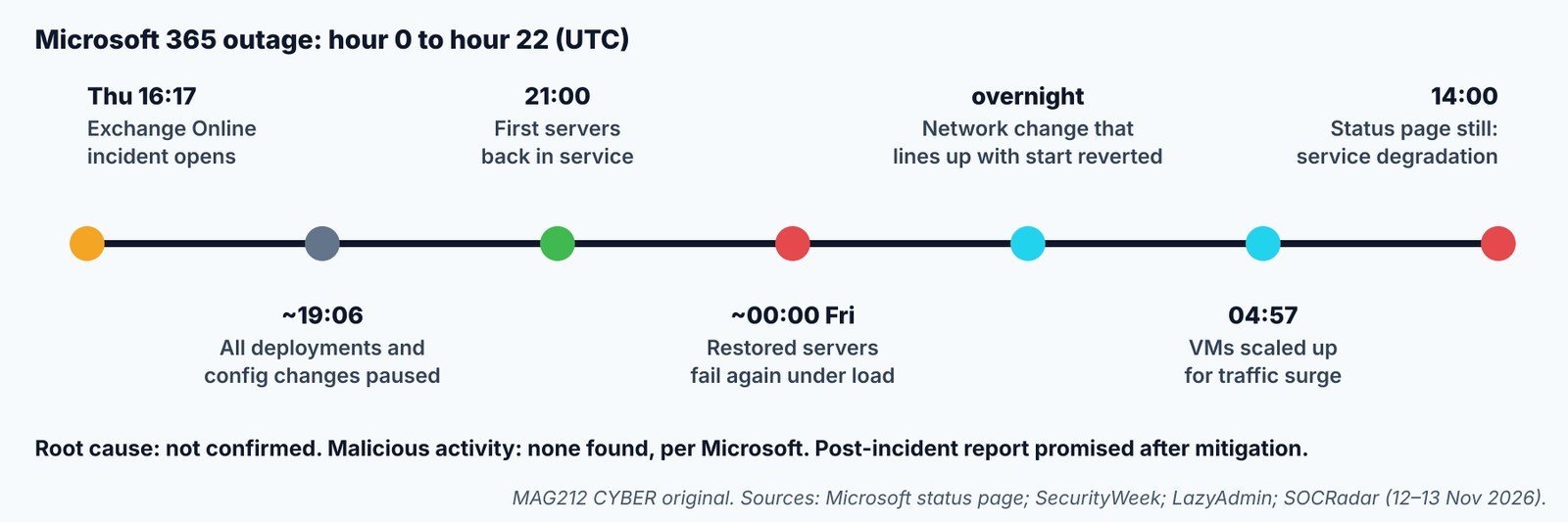
[Confirmed] At 14:00 UTC on Friday (6 a.m. Pacific), Microsoft’s public status page still listed Microsoft 365 business and enterprise services as degraded, with “Users may be unable to connect to multiple Microsoft 365 services”, and consumer products also degraded. (Microsoft status) [Reported] Both incidents remain open. Microsoft says features that depend on Exchange Online are impacted while the rest keep working, has found no malicious activity, and will publish a post-incident report with root cause after mitigation. (SecurityWeek)
[Reported] Overnight, Microsoft described a process on the affected servers “that sets up secure connections” becoming overwhelmed, after which the servers stop handling requests. It paused all deployments and configuration changes around 19:06 UTC Thursday, began reverting a recent network change whose timing lines up with the outage, and at 04:57 UTC scaled up virtual machines to absorb a traffic surge. Servers returned to service around midnight UTC failed again under load. Microsoft has not said the network change caused the outage. (LazyAdmin) (SOCRadar) (WindowsForum)
What to do now
Track the incident when the admin center won’t load
OS: Windows / macOS / Linux · Shell: PowerShell 7 + Microsoft Graph SDK · Privileges: ServiceHealth.Read.All · READ-ONLY
Connect-MgGraph -Scopes 'ServiceHealth.Read.All'
Get-MgServiceAnnouncementIssue -ServiceHealthIssueId 'EX1550543' |
  Select-Object Id, Status, Classification, LastModifiedDateTime, Title
Get-MgServiceAnnouncementIssue -ServiceHealthIssueId 'MO1550821' |
  Select-Object Id, Status, LastModifiedDateTime
Shows Microsoft’s own status and last update time for your tenant. Sign-in may itself fail during the outage; use the public status page if so. Commands not tested by MAG212 CYBER.
- Users: don’t reset passwords or reinstall Outlook. Mail sent to you is normally delivered once service returns.
- IT: freeze changes to MFA, Conditional Access and mail flow; send one status note a day; keep an out-of-band channel for urgent work.
- [MAG212 analysis] Security teams: Defender XDR and Purview were on the affected list, so check for alert backlogs once service returns, and warn staff about outage-themed “re-verify your account” phishing.
- Afterwards: read the post-incident report, check whether the outage qualifies for SLA service credits, and log your business impact.
Verify recovery: both incidents show as resolved, mail queues drain, and Teams calendars and SharePoint search behave normally. (Our 12 Nov coverage)
Reading the signals
[MAG212 analysis] Microsoft’s own updates describe a component that sets up secure connections becoming overwhelmed. Servers returned to service fell over again under load, which is typical of a recovery where pent-up demand from millions of clients arrives at once. Scaling up capacity, as Microsoft did overnight, addresses that symptom. Whether the reverted network change was the trigger is still unconfirmed, and we have not treated it as the cause.
[MAG212 analysis] Multi-day cloud outages are rare but not unprecedented, and they expose plans that assume email is always available. Password resets, MFA enrolment, incident notifications and supplier communications often all run through the same mailbox. This is a good moment to write down which of those you could do without Exchange Online.
Why it matters
Exchange Online underpins email, calendars and many Teams, SharePoint and security features for hundreds of millions of users. A second day of disruption affects business operations, but it also creates security risk: alert pipelines in Defender and Purview may lag, and attackers reliably send outage-themed phishing that asks users to “re-verify” their accounts.
The bottom line
Track EX1550543 and MO1550821 on Microsoft’s status page or through Graph, freeze identity and mail-flow changes until both are resolved, warn staff about outage-themed phishing, and review security alert backlogs once service returns. When Microsoft publishes its post-incident report, check it against your own impact and any SLA credit you may be owed.
How we label evidence: [Confirmed] comes from a primary source such as a vendor or CISA; [Reported] from a secondary outlet; [Claimed] from an attacker or an unverified party; [MAG212 analysis] is our judgement; [Unknown] means not established at press time. Commands and indicators are copied from the cited sources and were not tested by MAG212 CYBER.
This story is part of MAG212 CYBER Daily, 13 November 2026, with the day’s other verified stories, the Defender’s Action Desk and a full source register. Get the daily briefing free: subscribe to MAG212 CYBER. By El Mostafa Ouchen.