
SSHole (CVE-2026-123158): The Narrow OpenSSH Bypass CISA Says Is Exploited

From the MAG212 CYBER Weekly, 14 November 2026. Status labels: confirmed by vendor, reported by researchers, or unverified. Every command below is copied from official documentation and was not tested by MAG212; run it only on systems you are authorised to administer.
Status: Fix confirmed by vendor (portable OpenSSH 10.6p2, 5 Nov). Exploitation is indicated by the CISA KEV listing (added 9 Nov, due 12 Nov, now passed) [1][21]. No public source names who exploited it. The earlier draft’s sensor and briefing sources (Previdian, Defender Daily, MyCERT) are unverified.
What happened
Portable OpenSSH 10.6p2 shipped on 5 November with “a critical security workaround that affects Linux systems that use the musl libc and PAM disabled”. The project considers the root cause “outside sshd, but it is exploitable via sshd and can be avoided there” [21]. The CVE record describes “misinterpretation of whether a string is intended to be a password hash”, where “for some configurations of accounts, any password between 256 and 1024 characters succeeds”. It is rated CVSS 3.1 8.1, and all versions before 10.6p2 are affected [2][24]. The reporter was Özgün Kültekin of Wakefield [21]. CISA added it to KEV on 9 November [1][25].
Who is affected
Alpine’s advisory says all of the following must be true [22]:
- The SSH server has no PAM: it runs
openssh-server(no PAM), oropenssh-server-pamwithUsePAM no. - Password authentication is on:
PasswordAuthentication yes, which is the default. - An account has
*in its password field. Examples include root, key-only users, directory users without shadow entries, or the tiny-cloudalpineuser. - A local account has a password hash: at least one has a
$5$or$6$hash.
Tiny-cloud images 3.18.11–3.24.3 ship the alpine user with a * password and passwordless doas, which is a direct route to root [22]. Container images built on affected Alpine bases inherit the exposure.
| Alpine branch | Fixed openssh |
|---|---|
| edge | 10.6_p2-r0 |
| 3.24 | 10.3_p1-r2 |
| 3.23 | 10.2_p1-r1 |
| 3.22 | 10.0_p1-r11 |
| 3.21 | 9.9_p2-r1 |
| 3.20 | 9.7_p1-r6 |
| 3.19 | 9.6_p1-r3 |
| 3.18 | 9.3_p2-r4 |
| 3.17 | 9.1_p1-r7 |
| 3.16 | 9.0_p1-r6 |
The fixed point releases are 3.21.10, 3.22.8, 3.23.8 and 3.24.4 [22]. Because distributions backport the fix (for example, 3.24 ships 10.3_p1-r2), check the package revision, not the upstream version string that sshd -V prints.
Why this matters
SSHole needs four conditions to line up, so most servers are not exposed, but CISA has listed it as exploited and its deadline has passed. Container images and appliances built on Alpine or other musl systems are exactly where unusual sshd configurations hide, which makes inventory the first job. (MAG212 analysis)
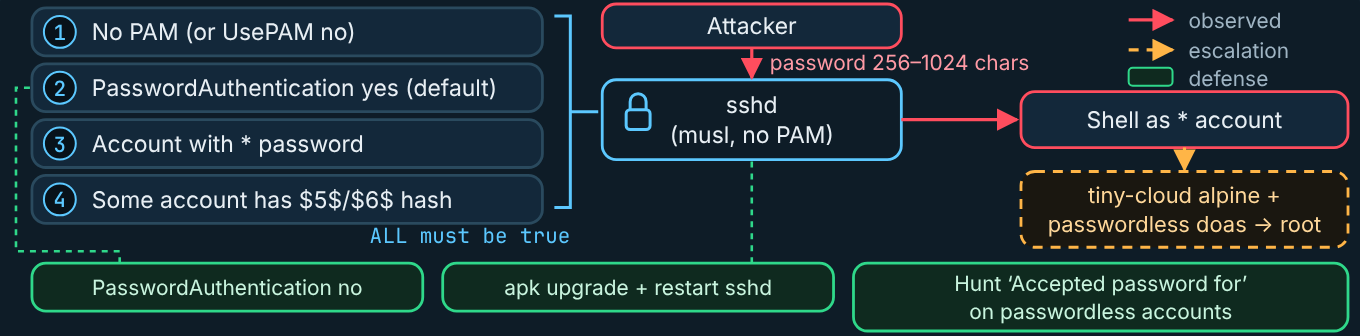
How the attack works
- The attacker reaches an exposed
sshdthat uses password authentication. - They try an account whose password field is
*, sending a password 256–1024 characters long. sshdmisreads the string as a hash and accepts it.- The attacker gets a shell with that account’s rights. On tiny-cloud images, passwordless
doasthen gives root. - Unknown: who is exploiting it, and at what scale.
What defenders should look for
Check /var/log/messages for Accepted password for by accounts that have no password (alpine, root, key-only users). Review doas use, new users, new files and changes to authorized_keys. If you cannot rule out a login, treat the host as compromised [22]. False positives: Accepted password lines for accounts that really do have passwords are normal. Failed attempts are routine scanning.
How to investigate
Inventory SSH listeners on Alpine hosts, Alpine-based containers and appliances. Use the effective-config check (SSH-1) on each. Correlate accepted logins with your access records.
Contain and remediate (in order)
- Upgrade the package and restart
sshd. Upgrading alone does not replace the running daemon [22]. - If you cannot upgrade, disable password authentication using Alpine’s documented steps (SSH-3).
- Rebuild affected container images.
- Isolate any host with a suspicious accepted login.
Verify recovery
Run sshd -T | grep -i passwordauthentication, which should return passwordauthentication no if you applied the mitigation. Confirm the package revision against the table above.
Prevention and awareness
Prefer key-only SSH, restrict management access to a trusted network, and send authentication logs to a central collector.
Command reference: OpenSSH / Alpine (sources: Alpine advisory [22]; OpenBSD sshd(8) [23])
SSH-1 – Show the effective password-authentication setting
- OS / shell / tool: Linux (Alpine), root shell,
sshd - Privileges: root
- Purpose: print the running configuration’s effective
PasswordAuthenticationvalue.sshd -Tis “Extended test mode … output the effective configuration to stdout and then exit” [23]. - Read-only or change: Read-only
- Command:
sshd -T | grep -i passwordauthentication- How to interpret:
passwordauthentication yesmeans the host meets one of the exposure conditions.passwordauthentication nomeans the mitigation is active [22]. - Not tested by MAG212.
SSH-2 – Apply the fixed package and restart the daemon (Alpine)
- OS / shell / tool: Alpine Linux, root shell,
apk, OpenRC - Privileges: root
- Purpose: install the fixed
opensshand replace the running daemon - Read-only or change: Change. It upgrades all packages and restarts
sshd, so keep an existing session open. - Commands:
apk upgrade -U -a
rc-service sshd restart- How to interpret: after the restart, confirm the installed
opensshrevision matches the fixed version for your branch. - Not tested by MAG212.
SSH-3 – Interim mitigation: disable password authentication (Alpine)
- OS / shell / tool: Alpine Linux, root shell
- Privileges: root
- Purpose: remove the vulnerable password path when you cannot upgrade
- Read-only or change: Change
- Commands, as published by Alpine [22]:
- Alpine’s advisory also includes a
sed -i.bak …edit of/etc/ssh/sshd_config. Copy that line verbatim from the advisory. MAG212 does not reproduce it. Then validate and restart:
- Alpine’s advisory also includes a
mkdir -p /etc/ssh/sshd_config.d
echo 'PasswordAuthentication no' > /etc/ssh/sshd_config.d/00-no-passwords.conf
sshd -t && rc-service sshd restart- How to interpret:
sshd -tis “Test mode. Only check the validity of the configuration file and sanity of the keys” [23]. If it prints errors, do not restart. Confirm the result with SSH-1. Make sure key-based access works before you close your session. - Not tested by MAG212.
Related on MAG212 CYBER
- MAG212 CYBER Weekly, 14 November 2026: The keys were already inside (full issue and PDF)
- Subscribe free to MAG212 CYBER
Sources
- [1] CISA (GitHub mirror), “Known Exploited Vulnerabilities catalog JSON, catalogVersion 2026.11.13”, 13 Nov 2026, 20:24 UTC. link
- [2] CVE Program, “cvelistV5 CVE JSON 5 records (CVE-2026-123039, -124194, -125350, -123158, -6460 and others)”, Various, Nov 2026. link
- [21] OpenSSH, “Release notes (OpenSSH 10.6p2)”, 5 Nov 2026. link
- [22] Alpine Linux, “OpenSSH password authentication bypass”, 5 Nov 2026. link
- [23] OpenBSD, “sshd(8) manual page”, Current. link
- [24] OpenSSH portable (GitHub), “Commit 4353fdc (SSHole workaround)”, Nov 2026. link
- [25] eSecurityPlanet, “CISA KEV adds GPUStack, FreeSWITCH, OpenSSH, IBM flaws”, 10 Nov 2026. link
Written and edited by El Mostafa Ouchen for MAG212 CYBER. Facts checked against the sources above as of 14 November 2026, 10:05 AM PST. Diagrams are original MAG212 CYBER illustrations.